The binder
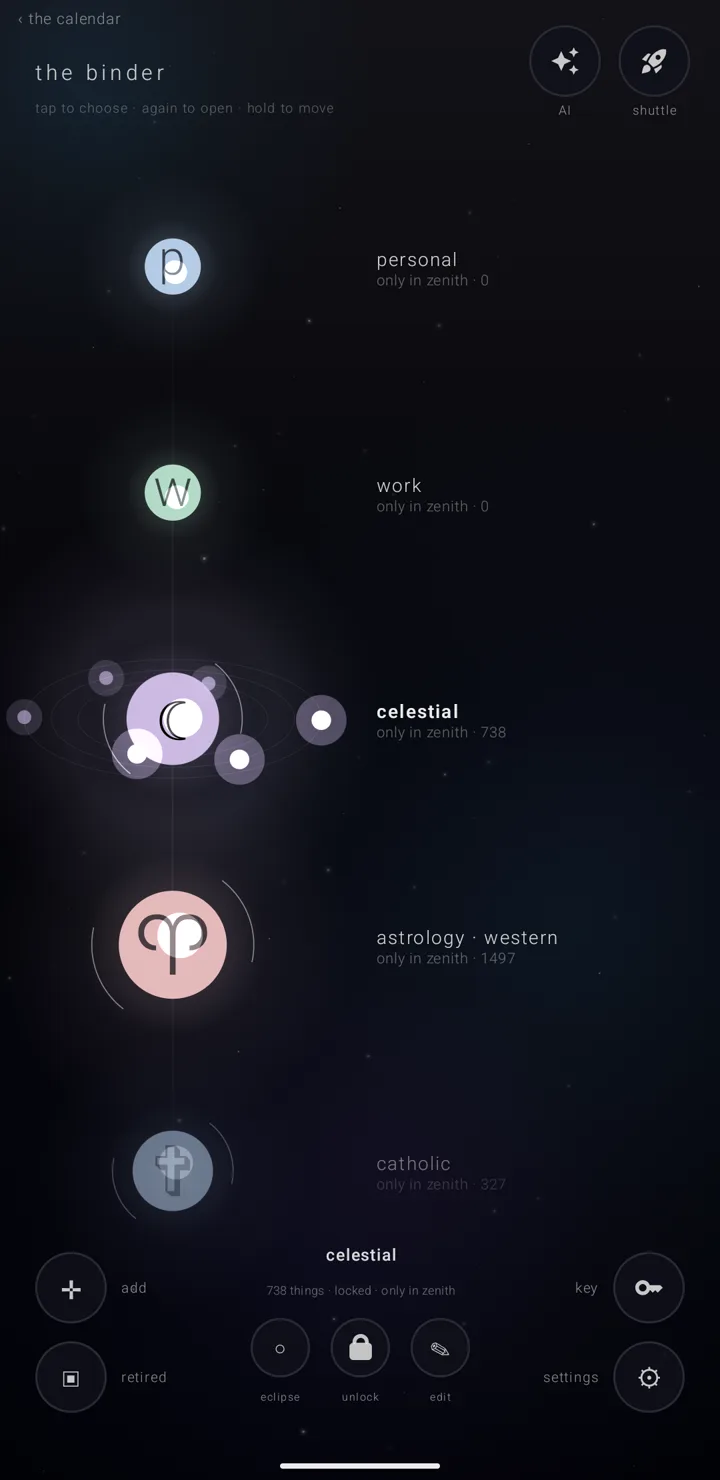
The binder — the screen that holds all your almanacs, in order — is where you manage them. An almanac is a named, coloured layer of commitments, like one calendar among several. In the binder, each almanac is a glowing body threaded on one spine, with a line under its name saying where it stands.
It is a full screen of its own, drawn in the same starry dark as the calendar, not a list of settings with switches.
Where it is
There are three ways in:
- On the sky — the calendar's main screen — hold the "almanacs" book in the bottom-right corner. A tap on the book opens the floating legend instead — see What an almanac is.
- In the legend, tap "manage ▸" after the last chip.
- settings › "the almanac binder", the row lined "what you have · what each is plugged into · order". Opened this way, the way out at the top left reads "‹ settings" instead of "‹ the calendar".
The title at the top left is "the binder". The thin line under it says what the taps do: "tap to choose · again to open · hold to move".
Choose and open
- Tap a row once to choose it. Its name goes bold and brighter, a slow glow widens round its body, and three tilted orbits turn about it. The strip at the foot fills with that almanac's details.
- Tap the same row again to open its page — see An almanac's page.
- Tap the empty sky to put it down again.
A row is the body and the name beside it. There is always a strip of sky between rows to tap on. On a wide screen the binder becomes a centred column with sky at each side.
Move an almanac
Hold a row and drag. The hold also chooses it, so its details are at the foot when you let go. It follows your finger, with one note for each place it passes, rising as it climbs.
Carry it to the top or bottom row you can see and the spine scrolls on its own, about half a screen a second, so you can reach a place far away. The one step back in the top-right corner undoes a move.
Order matters. An almanac's place in the binder decides:
- which comes first when two things happen at once
- the order of the almanac fan on the year — see The year & the years
- how far from the sun its belt of bodies sits
Two drop places appear while you carry an almanac, and only then:
- "▤ archive it" — a half-filled block — "OFF THE CALENDAR · EVERYTHING KEPT". The archive is the shelf for almanacs you have put away but kept.
- "❋ the pyre" — a six-spoked star — "THIRTY DAYS · PULL IT BACK OUT ANY TIME". The pyre is where a thrown-away almanac waits thirty days before it is gone.
The one under your finger says "let go — ‹name›" and gains a second rim. While you are over one, the spine stops shuffling. What each place does is on The shelves — binder, archive & pyre.
The order a new phone starts with
A fresh install starts with "personal", "work", "celestial", "astrology · western" and "astrology · vedic", then every holiday almanac sorted by its religion first and its own name second. Only the ones you lit on "your starting sky" are on this shelf; the rest wait in the archive in the same order. Once you move anything, the order is yours, and an update never moves it back. See Install & make it your calendar.
The demo almanacs, once you add them, stand on the spine like any other, each added at its end. Two of them arrive locked, as they ship, and one of those two lands on the archive shelf. The binder's settings remove them all at once. See The binder's settings.
Scroll
Drag up or down to move the spine. Flick it and it keeps going at your speed; a touch catches it. A flick never leaves an almanac chosen by accident. How many almanacs fit on one screen is a setting — see The binder's settings.
The strip at the foot
When an almanac is chosen, the strip shows:
- its name, in bold
- one line of facts: how much is in it, "eclipsed", "locked", and what holds it — "only in zenith", "paused", "syncs with ‹source›", "reads from ‹source›", "its source is not sending" or "its calendar is gone"
- three round buttons:
| Button | What it does |
|---|---|
| "○ eclipse" / "● shine" | stops drawing the almanac, or draws it again — kept either way. It says "“‹name›” is eclipsed — kept, but not drawn" or "“‹name›” shines again". On the archive this button is "▥ put back" instead. |
| "lock" / "unlock", a padlock | locks the almanac so nothing changes it, or unlocks it so it can be changed — see The lock |
| "✎ edit" | opens the almanac's own page — see An almanac's page |
There is no button here to retire an almanac or send it to the pyre. Do those by holding the almanac and carrying it onto "▤ archive it" or "❋ the pyre", which appear only while one is carried.
The strip is hidden while you carry something.
Reading a body without words
- Colour — the almanac's own; size — how much it carries.
- Filled while it shines; a bare outline while it is eclipsed.
- Its mark — its small glyph or picture — on it.
- A ring for its connection: closed means it writes both ways; a second faint ring means it carries Zenith's own detail out too; an open arc means it only reads; dashed means paused; a gold pulsing ring is a warning.
- Brackets on each side when it is locked — see The lock.
- A letter on the far side for the service that feeds it.
The "key" button in the bottom-right corner draws all of these beside what they mean, headed "HOW TO READ AN ALMANAC".
The corners
| Corner | What is there |
|---|---|
| Bottom left | "✛ add", a cross. A tap makes a commitment on the day the sky was last on; a hold offers "✛ a commitment" and "◔ an almanac". Under it, "▣", a square of shelves, which turns between the binder, the archive and the pyre — see The shelves — binder, archive & pyre. |
| Bottom right | "key", and "settings", the gear ⚙. Tap the gear for the "all your almanacs" panel; hold it for quick settings — see The binder's settings. |
| Top right | the one step back, "AI" and "shuttle" |
Everything in the corners steps aside while you carry something or a sheet is open.
With no almanacs, the binder says "no almanacs yet".
See also.
What an almanac is · The shelves — binder, archive & pyre · An almanac's page · The binder's settings