An almanac's page
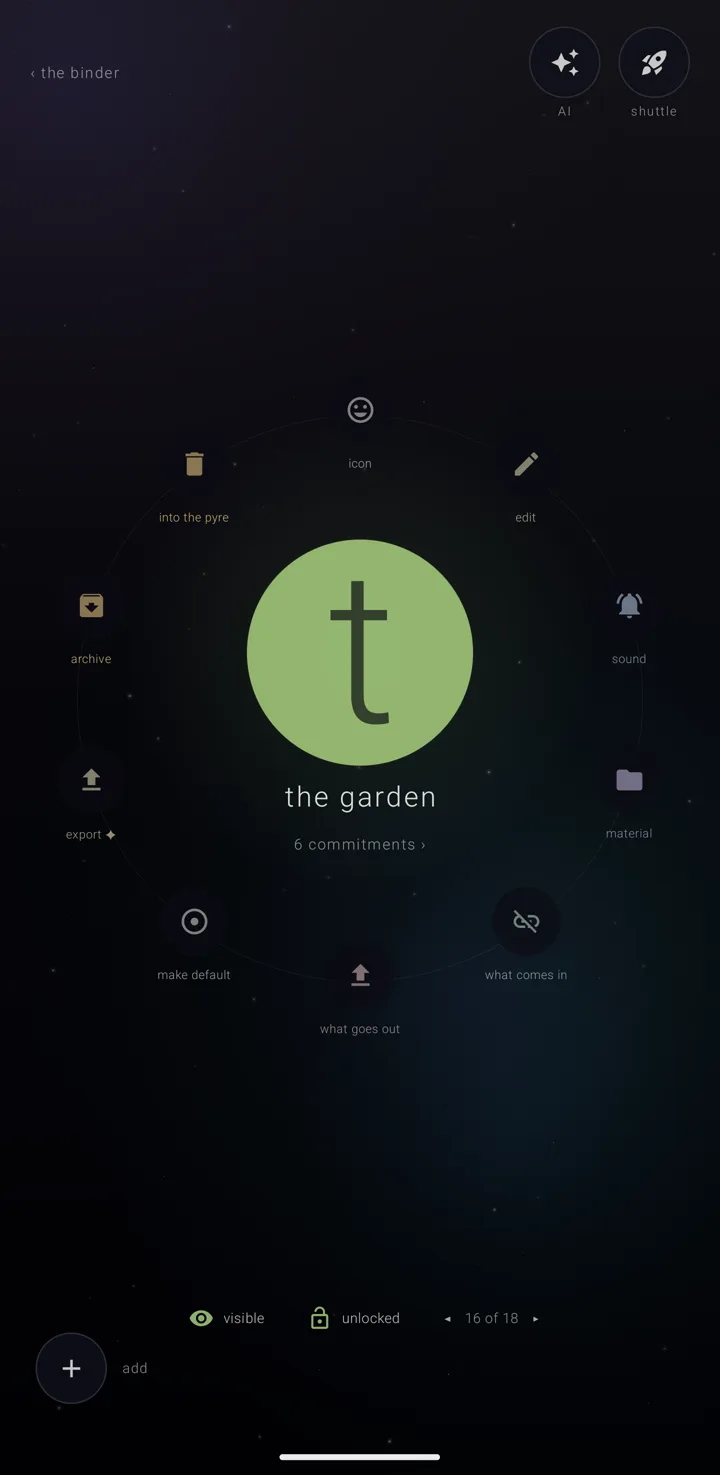
An almanac — a named, coloured layer of commitments, like one calendar — has its own page. The almanac is drawn in the middle of the screen, with everything it can do in a ring of doors around it.
Where it is
- In the binder — the screen that holds all your almanacs — tap a row once to choose it and again to open it. See The binder.
- On a commitment's page, tap the line naming its almanac.
- A newly made almanac opens on its page.
Top corners
- Left: "‹ the binder", where "‹" is a back arrow.
- Right: the one step back, when there is a step to take; then "AI" — "ask the sky about this almanac"; then "shuttle".
The almanac itself
A disc in the almanac's colour, wearing its mark — a picture from an icon pack or the phone if it has one, otherwise its glyph, otherwise the first letter of its name.
- Filled while it is drawn on the calendar; a hollow outline while it is eclipsed or archived.
- A ring around the disc shows what feeds it: dashes while paused, a closed ring while your edits go back, a second faint ring outside that while Zenith's own detail goes along too, and a broken arc when nothing goes out. A bead orbits it unless paused.
- A bracket on each side means it is locked.
- A gold ring means its source is in trouble. Above the almanac, in gold, stands the problem and the way to act: "its calendar is gone from this phone", or "‹source› is not downloading it →", which opens the phone's own sync settings. Zenith never switches the phone's downloading on for you.
Under the disc, its name in lower case. Under that, "1 commitment ›" or "‹n› commitments ›", which opens the list.
What feeds it
One line shows the source's badge letter, its direction arrow, what kind of thing it is, and what it is called. Beneath it, small switches, as many as apply:
- "listening" / "paused" / "not watching · all"
- "writes out" / "zenith only" / "held back · all"
- "detail" / "plain"
- "unplug" — or "take it off your drive" for a Drive copy, which asks first
A switch held down by one of the binder's two overrides says so instead of showing the almanac's own setting — see The binder's settings. What each source does is on What comes in, what goes out.
Two switches beside the name
These flip in place:
- "visible" — "drawn on the calendar" — or "eclipsed" — "eclipsed — kept, but not drawn".
- "locked" — "everything about it is shut — tap to unlock" — or "unlocked" — "open — it can be worked on". The lit padlock is on the side where you can act, so the unlocked one is lit. See The lock.
Where it sits
"◂ ‹n› of ‹m› ▸" moves the almanac up and down the binder's order. It says so when the almanac is already first or last.
The ten doors
Each door shows its short word, and its fuller line while you touch it.
| Door | What it opens |
|---|---|
| "icon" | "the mark it wears" |
| "edit" | "its name, colour and what it is for" |
| "sound" | "when it rings, and what it sounds like" |
| "material" | the files the almanac carries — see What you fill in, material & place |
| "what comes in" | the one place it is fed from |
| "what goes out" | where what you write in it is copied to |
| "make default" | makes it the almanac new commitments land in |
| "export" (Gold) | saves the almanac out as a file — see Backup, restore & sending an almanac |
| "archive" | retires it to the archive |
| "into the pyre" | sends it to the pyre for thirty days |
A door the almanac cannot use is still drawn, dimmed, and says why when tapped. The first three are covered in Edit an almanac. The archive and the pyre — where a thrown-away almanac waits thirty days — are on The shelves — binder, archive & pyre.
Ring or banks
- Upright, with room: the doors ride a circle. Drag a finger round it and the line at the foot follows the door under your finger, with a bead of light riding the circle.
- Sideways: the almanac takes the left of the page, with its name, source and switches under it. The doors go into banks on the right.
- Upright but too narrow: everything runs down the page in one scroll.
"add"
Bottom left, "add" — "put a commitment on it". It is always drawn. If the almanac cannot take a commitment, it says why: the lock's sentence, or "its source will not accept anything".
What it asks before it acts
- Default: "make “‹name›” the default? every commitment you make from now on lands here unless you say otherwise."
- Archive: "archive “‹name›”? it keeps everything — its name, its colour, its place — and comes off the calendar and the legend."
- Into the pyre: that it waits thirty days and can be pulled back the whole time, with the count of commitments going with it. If it is plugged in, it adds " nothing is removed from ‹source›."
Each question shows in gold, with the act and "undo". Archiving keeps you on this page, with the one step back available. The pyre closes the page and leaves the step back on the binder.
When it is locked
Nine of the ten doors are greyed and wear a small padlock, so the page looks closed before you tap anything. "export" stays open, because saving a copy changes nothing. The source switches are struck through, and each says "it is locked — unlock it first".
Going back
The back gesture closes one layer at a time. Anything open above the page closes first; only the bare page returns to the binder.
See also.
The binder · Edit an almanac · The lock · What comes in, what goes out