Time & directions
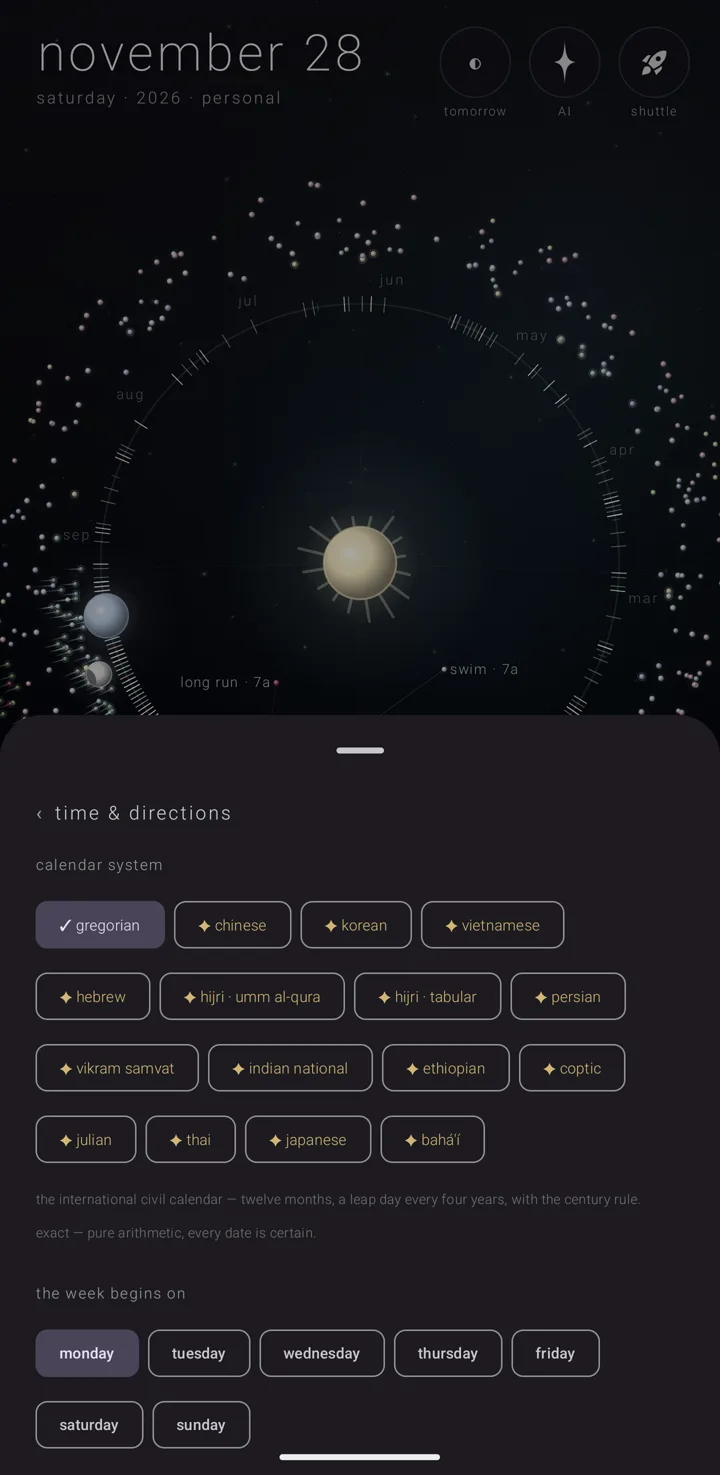
This page of the settings book decides how the calendar counts and turns. It sets which tradition the calendar counts in, how days and weeks are named and ordered, where the year's starting point sits, and which way the orrery turns — the orrery being the sky's sun, earth and moon seen as one moving system.
Where it is
Hold the gear ⚙ to open the settings book, then tap settings › "time & directions". Its row is lined "calendar system · week start · clock · orbit · spins".
There are ten settings, in the order the page draws them. The last three sit together at the foot.
1. "calendar system"
Which tradition the calendar counts in. There are sixteen chips. "gregorian" is free. The other fifteen need Zenith Gold (Gold), and each carries "✦", the gold spark that marks what Gold opens. Two lines under the chips say what the chosen system is and how exact it is.
All of it is on Calendar systems & names.
2. "names as"
"romanization", "translation" or "original script", for the tradition's months, day names and year words. It appears only while a system other than "gregorian" is chosen. See Calendar systems & names.
3. "the week begins on"
Which day is the first main column of the week. Any of the seven. It starts on Monday.
Everything that lines up a week asks this one setting. So the week view, the month grid's columns, "today" and landing on a day always agree. Choosing a new day also realigns the week view already on screen.
While a tradition other than "gregorian" is chosen, that tradition's own first day wins. The seven chips give way to one line naming it, ending "your own choice comes back with gregorian." For example:
| Tradition | Week begins on |
|---|---|
| Persian, Islamic, Bahá'í | saturday |
| Hebrew and most others | sunday |
| Chinese, Vietnamese | monday |
4. "24-hour clock"
A switch for how the app says a time.
- Off, the app's own short way: "7p", "2:12p", "12a". The minutes are left off on the hour.
- On, the 24-hour clock: "19:00", "14:12", "0:30". The hour has no leading zero, and the minutes are always there.
Until you first flip it, it follows the phone's own clock setting, and the switch shows that. Once you flip it, it keeps your choice.
It reaches every time the app shows you:
- a commitment's page, the day's brief and the week view's times;
- the day view's dial, which reads "0:00", "6:00", "12:00", "18:00" in place of "midnight", "6a", "noon", "6p";
- the new-commitment form's quick times, which read "9:00", "12:00", "15:00", "18:00", "21:00" — the same times as "9a", "noon", "3p", "6p", "9p" — and its clock faces;
- the tomorrow sheet, share text, the announcements and their notices, and the reminder and evening-before notices;
- the days-ahead widget, which redraws at once when you flip it;
- the desk clock, which reads "19:05" on and "7:05" off;
- what ask the sky — the built-in AI assistant — is told and says.
A notice says its time the way the switch is set when it rings. See Announcements.
5. "day names show as"
How a weekday is written in the week and month headers. Four chips:
| Chip | What you see |
|---|---|
| "U" | One letter: M T W R F S U. R is thursday and U is sunday, so all seven stay distinct. |
| "Su" | Two letters. |
| "SUN" | Three letters. |
| "☉ ☽ ♄" | The days' classical planets: ☽ the moon, ♂ mars, ☿ mercury, ♃ jupiter, ♀ venus, ♄ saturn, ☉ the sun. |
It starts on one letter.
While a tradition is chosen, the letters are its own day names, shortened to two or three characters. They never shorten to one, because a tradition's names do not shorten that far. The planets are the same in every tradition.
6. "the year is anchored to"
Which day sits at the bottom of the year dial.
- "the solstice" puts the solstices and equinoxes at the compass points. The december solstice is at the bottom, june's at the top, and the equinoxes at the sides. This is the starting choice.
- "new year's day" puts january 1 at the bottom instead, and the whole calendar turns with it.
It turns the picture and nothing else. A ring is still one calendar year, 1 january to 31 december, whichever day sits at the bottom. The sky's own seasons ignore this setting. See The year & the years.
7. "the year ring shows"
- "calendar year" — runs january to december, with yesterday sitting behind the earth. This is the starting choice.
- "next 365 days" — a ring that rolls with you. The slot behind the earth is a year from now rather than yesterday.
The rolling ring applies only while the ring on screen is this year's. Travel to another year and that year is shown whole, however this is set.
The three reversals
The last three settings are one switch each, for one body each. The app's directions are correct as they come, and all three start off.
8. "reverse the year orbit"
The year ring runs clockwise instead of anticlockwise. It mirrors the ring, and everything on it follows: the earth's place, the moon's place, every commitment's position and the day's fan. What you touch stays where you see it.
9. "reverse the earth's spin"
Which way the day globe turns, counted from where the sun stands that day. Everything on the globe follows: the elapsed wedge, the night arc and every commitment's arc.
It also decides which way a sideways swipe on the day view walks through the days. See The day view.
10. "reverse the moon's spin"
Which way the moon's own views — the week and the month — travel under a sideways swipe. The week walks whole weeks and the month rolls whole months, each pulled your way or the other.
The moon's place on the year ring does not follow this switch. That follows "reverse the year orbit".
See also.
Calendar systems & names · The orrery · The week view · The settings book