Privacy, permissions & what leaves the phone
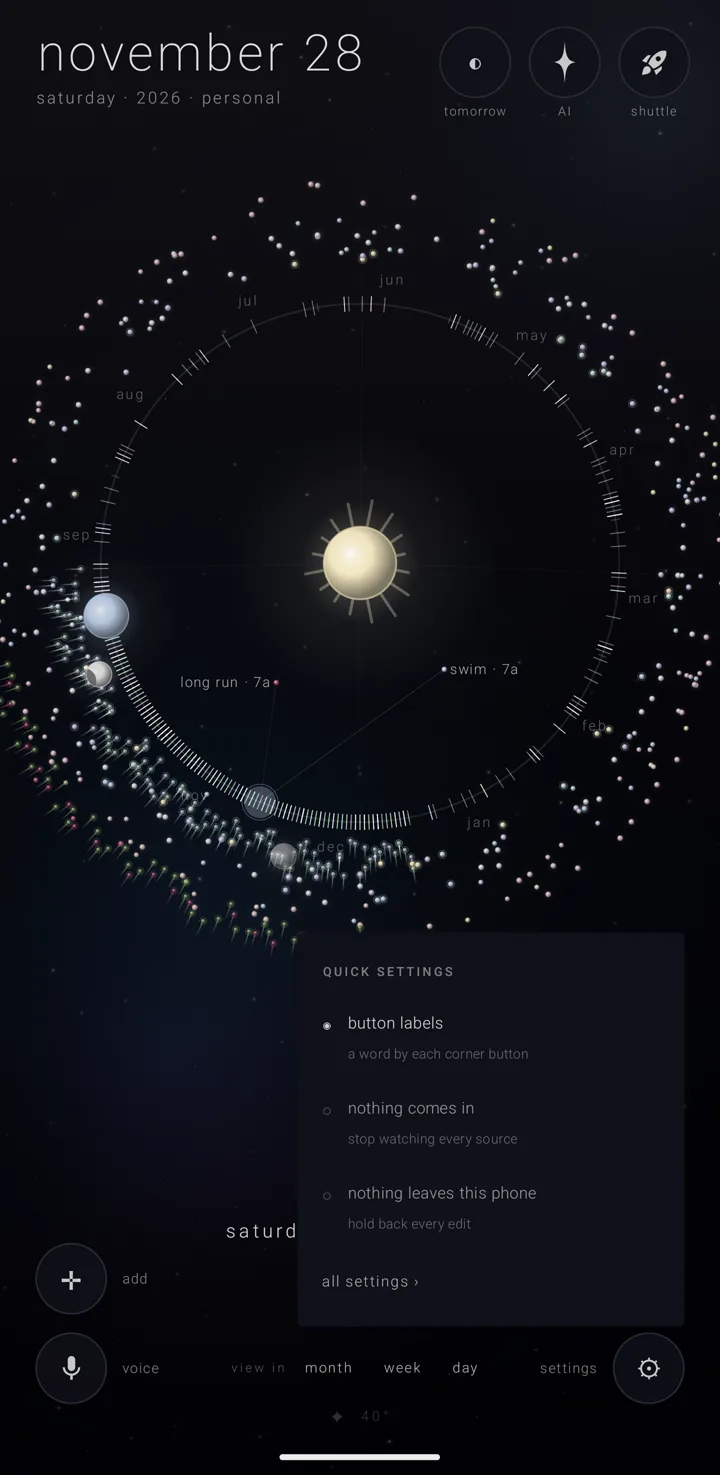
The calendar has no server of its own. Everything it keeps lives in this app's private storage on your phone. Anything that goes out goes to a service you chose, to your own account, or to a file you decided to write. The suite's shared privacy rules are on Privacy across the suite.
No permission is asked for on the first launch. Every permission is asked at the moment something needs it, and you can grant or take back any of them later in the phone's own settings for this app.
What is asked, and when
The phone's own calendars
Reading and writing the phone's calendars is asked as one thing. It lets an almanac — a named, coloured layer of commitments, like one calendar — be fed by an account already on the phone: google, outlook, work, local.
It is asked from step 1 of "make zenith your calendar", or from an almanac's own list of calendars. The sheet says what it means: "read here on the device; nothing is sent anywhere."
Refuse it and the calendar works entirely on its own almanacs. Nothing on the phone's calendars can be seen, shown or fed into one, and the setup row stays at "not yet". See Install & make it your calendar and Travel & the phone's own calendars.
Location
Only coarse location is asked. There is no precise location and no background location in this app at all. Location is read, not watched: the phone's last known position is asked for when something needs it, and nothing follows your movement.
It is used for three things: real daylight on the day view's globe, "my sky" (Gold), and the weather. It is asked when you open the day view with nothing known yet, and when you switch "my sky" on.
Refusing is a working state, not an error. The globe and my sky draw a guess at 40° north, and the phone's own time zone stands in.
Notifications
Asked the moment you switch a bell on, not before. If the phone refuses, the top of settings › "notifications" turns to a warning: "this phone is not letting zenith calendar notify you at all — nothing below will arrive until you allow it · tap to open the phone’s own page for this app". The line is a button to that page.
Every bell you have switched on also says " · the phone is blocking this" beside its name. See Reminders.
The rest
- Exact alarms are granted on install to calendar and alarm apps, and never put a question on screen. Without them, reminders would land somewhere in a ten-minute window.
- Vibration carries the small ticks under scrubbing and landing. See Ease — motion, colour & touch.
- Internet is for the features that need it, each listed below under what goes out: the assistant's calls to the AI service you chose, the weather, place search, and your own Google account (Drive, and making a calendar). The phone's calendars don't use it; they are read from the phone itself.
- One Zenith permission, guarded so only an app signed with the suite's own key can speak through it. See How the calendar fits the suite.
There is no contacts permission at all. Adding somebody to "joined by" uses the phone's own contact picker. It hands back only the one contact you chose: its name, and a link so a tap later opens the same person. See People on a commitment.
What never leaves
- The phone's own calendars are read on the phone. Nothing read from them goes out. Ask the sky's calls go over the network; calendars do not.
- The names on a commitment stay inside Zenith. "joined by" names are never written into a phone calendar or a Google calendar, nor into the note Zenith leaves on a travelling entry. A guest list is something Google can email invitations from.
- A file you send carries plain names and no contact links.
- A backup and your own Drive copy keep the links, because they come back to you.
- A contact link arriving from somebody else's phone is dropped, because it points at their contacts.
- A crash report is written on the phone and never sent unless you read it on settings › "about" and send it yourself.
- The AI safety log has always been a file on the phone only.
- Remembered talks are one file here.
- Your AI keys go nowhere but to their own service, as the header on a call you made.
- The suite's broker and the shuttle stay on this phone. The broker is the private doorway between Zenith apps; the shuttle is their shared tray. A sibling app's abilities are reached through it, not over a network. See The Shuttle.
- Material does not travel with an almanac through a calendar. Material means an almanac's files. They stay on the phone and move only by hand, in a file you write.
What does go out, and where
- An ask to the sky — your words and what rides with them, to the one AI company you set, at its own host, under your own key, after you said yes to that company. See Safety, consent & your rights.
- The weather — your position rounded to two decimals, roughly a kilometre, to Open-Meteo. No key, no account, at most once in thirty minutes, and only when a location is known. See Weather.
- A place search — the words you typed, and optionally where the map is looking, to OpenStreetMap's Nominatim, free and keyless. Opening a pin hands off to your maps app rather than fetching anything. See What you fill in, material & place.
- An almanac carried in your Drive — the almanac's own document, whole, into your own Google Drive. The permission covers only files this app created, so it can't see, list or touch anything else there. It reaches your other devices and nothing else. Taking it off deletes that copy and its material there. See Connected accounts & Drive sync.
- An almanac travelling in an account's calendar — the one setting under which an almanac's contents leave the device. Of the three levels an almanac can sit at, a private one is a file of the calendar's own. "on this phone" writes a calendar Zenith owns that the system never uploads: the rest of the phone can see it, Google can't. What then crosses the internet is the account's own sync, not this app's. See Travel & the phone's own calendars.
- Making a calendar in a Google account — exactly one web request, for the one thing the phone's own store can't do. Permission is asked at the tap, limited to calendars this app makes, used once and never stored. It can't list the account's calendars.
- A file you write yourself — a backup, one almanac, a plain calendar file, or one commitment as a card, to wherever you pick. See Backup, restore & sending an almanac.
- A line of text you share — "↗ take it elsewhere" › "↗ share" puts one line on the shuttle and hands the same line to the phone's own share sheet, where you choose who gets it. See Share a commitment.
The two overrides — the calendar's offline mode
Two switches act on every almanac at once without changing any almanac's own setting, so lifting one puts each almanac back exactly as it was. Both start off.
- "nothing comes in" stops Zenith watching every source for changes, and only that: "zenith has stopped watching every source for changes. what has already arrived stays in its almanac. each almanac keeps its own setting for when you lift this — and this does not hold your edits back, which is the switch below."
- "nothing leaves this phone" holds every write back, which stops items 4, 5 and 6 above at once: "zenith writes nothing back to any source. everything you do stays here, and what it already wrote out stays where it is." The moment you lift it, what was held is sent out, and anything carried in Drive is pushed up.
They live in two places, and they are the same two switches in both. One is the binder — the page where your almanacs live — under "everything that reaches outside"; see The binder's settings. The other is quick settings, a tap on the gear ⚙, where they read "nothing comes in" ("stop watching every source") and "nothing leaves this phone" ("hold back every edit"), each marked ◉ when on and ○ when off. Anything they stop says which one is in the way.
AI companies are asked first
Before anything goes to an AI company, you are asked, by name, once per company. A no sends nothing. The on-device service, which needs no key, is never asked about, because nothing leaves the phone for it. Every yes is listed, and can be withdrawn, on settings › "ask the sky" under "SENT WITH YOUR YES". The full list of what can travel is on Safety, consent & your rights.
Your location, in short
One permission, coarse, never in the background, read rather than watched. The only thing that sends a position off the phone is the weather, and it rounds it first.
See also.
Privacy across the suite · Safety, consent & your rights · What comes in, what goes out · The binder's settings