Ease — presets & sizes
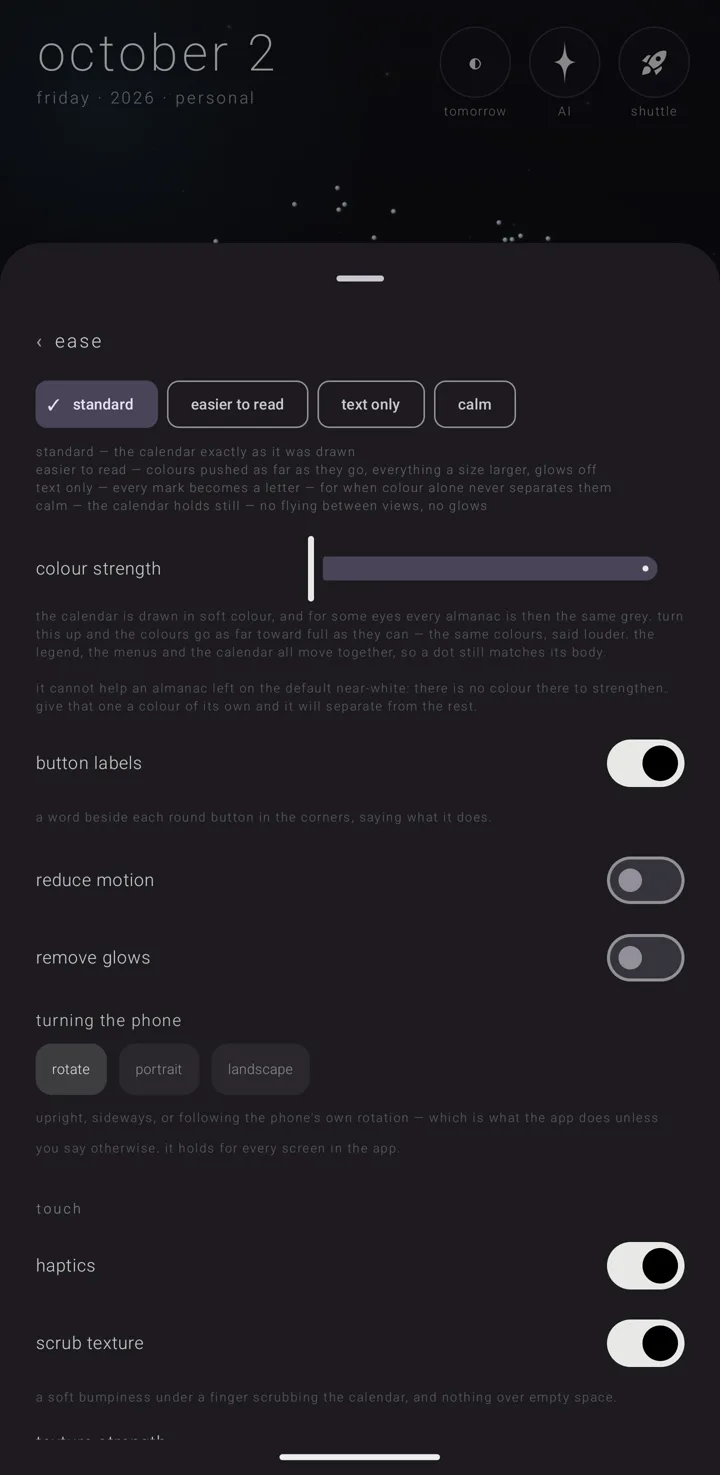
settings › "ease" is the page for making the calendar easier to see, read and hold still. Its line in the settings book reads "colour strength · labels · turning the phone · haptics · reduce motion". To open the book, hold the gear ⚙ in the bottom-right corner of the sky — the sky being the whole calendar, one canvas that becomes each view.
Everything on this page is free. This page covers the presets and the sizes. Colour, motion and touch are on Ease — motion, colour & touch.
The page always opens scrolled to its top, so the one-tap presets are the first thing you see.
In order on the page: the presets · "colour strength" · "button labels" · "reduce motion" · "remove glows" · "immersion mode" · "turning the phone" · "touch" · "marks as letters" · "commitment size" · "earth & moon size" · "↺ back to standard" · "view transitions" · the text sizes. This page and Ease — motion, colour & touch describe them by topic, not in this order.
Four one-tap presets
Four chips sit above all the sliders: "standard", "easier to read", "text only" and "calm". They come first on purpose. If you cannot read the sky, the ready-made answers should not hide below controls you cannot use. What each one is for is written under the row. The one you are on carries a tick "✓", not only a tint, in case two greys look the same to you.
| Preset | Its own words | What it sets |
|---|---|---|
| "standard" | "the calendar exactly as it was drawn" | colour strength 1, marks as letters off, commitment size 1, earth & moon size 1, reduce motion off, glows on, immersion mode off, view transitions on, all five text dials at 1 |
| "easier to read" | "colours pushed as far as they go, everything a size larger, glows off" | colour strength at its maximum, commitment size 1.6, earth & moon size 1.25, glows removed, text 1.3. Marks are left alone, so a picture you chose stays |
| "text only" | "every mark becomes a letter — for when colour alone never separates them" | everything "easier to read" does, plus marks as letters on, commitment size 1.8, earth & moon size 1.3, text 1.5 |
| "calm" | "the calendar holds still — no flying between views, no glows" | reduce motion on, view transitions off, glows removed. Colour and size stay where they were |
"text only" is kept apart from "easier to read" because it overrules marks you chose on purpose. "calm" leaves sizes alone because wanting the sky to hold still is not the same as wanting it bigger.
A preset changes only the settings listed for it in the table, and nothing else. It never touches the sky's theme, which almanac is in front, or anything you made. No preset touches the touch settings or "button labels".
"↺ back to standard"
The turning arrow ↺ marks one button that puts the whole page back. That means every setting listed for "standard" in the table, the four touch settings, and the two rows no preset touches, "button labels" and "turning the phone". Nothing else moves. The line under it says: "puts every setting on this page back where it started, the earth & moon size with them. nothing else is touched — not your calendar, not your almanacs."
It shows whenever anything on the page differs from standard — including the touch settings, "button labels" and "turning the phone", which no preset changes. So it can sit beside a ticked "standard". Tap it and you see "ease is back to standard". Because it is there, you can try anything on this page without worry.
Sizes
"commitment size" — 0.7 to 2.2, starts at 1. How big commitments are drawn on the sky: the meteors ☄ that pass once, the asteroids ↻ that keep coming round, the fixed stars ✦ of the zodiac, and the dots on an open fan. Without it, the things you look for can be tiny dots, and no colour makes a tiny dot easy to read.
"earth & moon size" — 0.6 to 2.7, starts at 1. How big the earth and the moon are drawn on the year. The same slider also stands on settings › "the sky" (see Skies, colours & my sky), and moving either moves the other. A bigger body is also bigger to touch, not only to look at.
There is no size dial for the ring — the great circle of the year round the sun. Scaling only its drawing would move the picture away from the place you tap.
"marks as letters" — a switch, off to start. Its line: "draws every almanac and commitment as the first letter of its name, whatever mark it was given — text is the one form that always takes the almanac's colour." An emoji cannot take an almanac's colour, and a photo at mark size is a smudge. Turning this on overrules every chosen mark at once, so you do not have to change twenty almanacs one by one. The "text only" preset turns it on.
Where letters take over: the week and month grids, the day view's all-day row, the binder and an almanac's page. The brief's ☄ ↻ ✦ are not marks — they show a commitment's form (once, repeats, yearly) — so they stay as they are.
"button labels" — a switch, on to start. Its line: "a word beside each round button in the corners, saying what it does." It is on because the marks alone say nothing to someone new. The screens around the buttons make room for the words: the day's brief gets a taller top, and the week view's hint line moves down. This switch is also on the short quick-settings list (see The settings book).
Text sizes
Five dials sit under the heading "text size — relative to the system's setting (the center is exactly the system size)". At 1, text matches the phone's own text size.
"everything" — 0.7 to 2.0, starts at 1. It sizes the text in the calendar's views. It goes up to double on purpose: people who need large text often need about twice the size.
Then, under "then pull any surface that reads too big or small", four dials that multiply on top of "everything". Each runs 0.8 to 1.6 and starts at 1.
| Dial | What it sizes |
|---|---|
| "the calendar's labels" | the words on the canvas — month names, day letters, labels on the rings |
| "the big date" | the large date at the top left |
| "the brief" | the day's list that rises over the calendar |
| "the takeover" | a commitment's own full-screen page |
Why some text stops growing. A symbol inside a fixed circle cannot outgrow it. At the phone's largest font with these dials turned up, the cross ✛ and the gear ⚙ used to spill out of their buttons. So text inside a fixed shape grows only as far as the shape can hold. Anything that can wrap — a label, a line of the brief — keeps the full size.
See also.
Ease — motion, colour & touch · Skies, colours & my sky · The settings book · The day brief