Edit an almanac
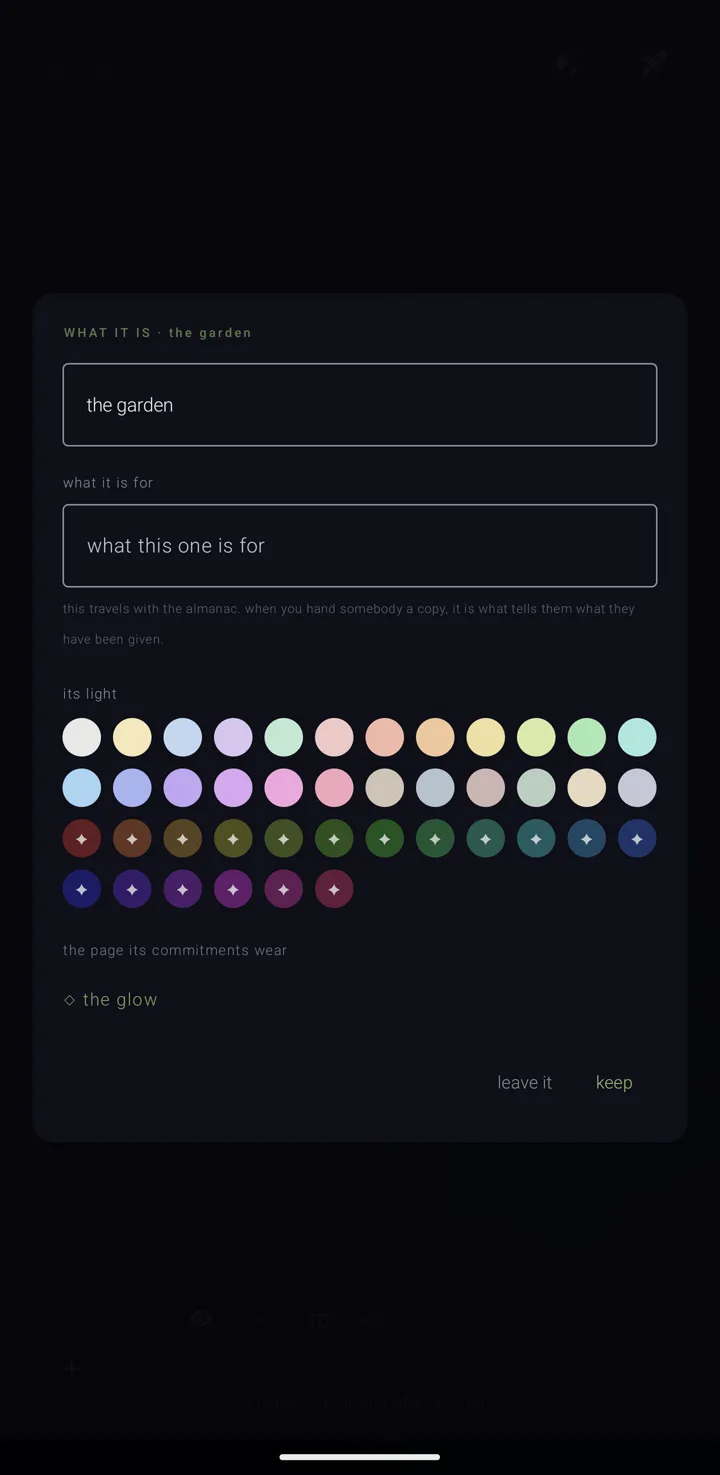
An almanac — a named, coloured layer of commitments, like one calendar — can be changed in three places:
- its own page in the binder — the fullest. The binder is the screen that holds all your almanacs.
- the menu on its chip in the legend — the cluster of almanac chips on the calendar — the quickest. See What an almanac is.
- the "edit this almanac" dialog — in between, doing most of it without leaving the calendar.
A locked almanac refuses every change here, with "“‹name›” is locked — unlock it first". Two things stay open: how it sits on the year, and moving it in the binder's order. See The lock.
Change its name, description and colour
- In the binder, tap the almanac twice to open its page. See An almanac's page.
- Tap "edit" on the ring. The sheet is headed "WHAT IT IS · ‹name›".
- Change what you want: - "its name" — one line. A blank name is not saved. - "what it is for" — a longer field, with the placeholder "what this one is for". "this travels with the almanac. when you hand somebody a copy, it is what tells them what they have been given." - "its light" — a row of round swatches. The chosen one has a tick and a white ring. The soft colours come first, then the vivid ones (Gold). Without Gold, a vivid swatch is faded and marked "✦", a four-pointed star, and a tap opens the Gold offer on "the vivid colours". - "the page its commitments wear" — shows "◇ ‹look›", a small diamond and the name of the look. Tap it to open "HOW ITS COMMITMENTS LOOK". There, "+ add a template" reads a look from a file; a file that cannot be read is refused.
- Tap "keep".
Nothing is saved until "keep". "leave it" and the back gesture both throw your changes away.
Change its mark
The mark is the small glyph, letter or picture the almanac wears.
- On the almanac's page, tap "icon". The picker is headed "the mark it wears".
- Choose one: - "type anything" — any one character: a letter, number, symbol or emoji. - "marks", "numbers" or "emoji" — each opens its own page. Marks and numbers wear the almanac's colour; emoji keep their own. - "pictures" — lists each installed icon pack by name, or "no icon packs installed.". Inside a pack, "search ‹n› icons". The page warns: "these stay on this phone — a picture cannot travel in a shared almanac the way a letter or a symbol does, so one that is sent out falls back to its letter." - "◈ a picture from this phone" (Gold) — a diamond with a centre. Without Gold, the row shows "✦ gold" and a tap opens the Gold offer on "a picture as an almanac's mark". - "⊘ no mark — go back to its letter" — a slashed circle, which clears any mark.
- Tap "keep", or "leave it" to change nothing.
With no mark, it says "no mark chosen — it wears the first letter of its name, which is the clearest form of all if colour is hard to read".
Change how it rings
- On the almanac's page, tap "sound". The sheet is headed "how “‹name›” rings".
- Set any of three answers. They apply to every commitment on the almanac unless a commitment says otherwise. - "how much warning" — "as the app does · ‹what the app does›", "at the moment", or 5, 10 or 30 minutes, an hour, 3 hours or a day. - "the evening before" — "as the app does", "always" or "never". "“never” quiets this almanac without turning the notice off everywhere else." - "what it sounds like" — "a system sound", "music" (any audio file on the phone), "silent" or "as the app does".
- Tap "keep", or "leave it". Trying out a tone changes nothing.
The sheet notes that "android keeps a sound on its own notification channel, so each tone you choose adds one under this app in android's settings. changing it there wins." See Reminders.
Use the quick dialog from the calendar
- On the sky — the calendar's main screen — tap the "almanacs" book to open the legend.
- Hold the almanac's chip, then tap "… more". The "edit this almanac" dialog opens.
- Change what you want: - "its name" and "what it is for". - A colour — every swatch, the soft set then the vivid ones marked "✦" (Gold). After the swatches, "◉", a ringed dot, opens a wheel to mix your own. - "ON THE YEAR" — two switches. "its commitments swing in" — "pick a day on the year and this almanac's commitments fan in toward the sun with everything else on that day". Under it, "its all-day ones come too". While the first is off, the second is dim and says "nothing of this almanac swings in while the switch above is off". See The year & the years. - Three acts that wait for "keep", each saying so: "◉ make default" becomes "◉ default when you keep"; "▲ move up" becomes "▲ up ‹n› when you keep"; and "archive" / "restore" becomes "archive when you keep".
- Tap "keep". It saves in this order: name, colour and description; the two year switches; the default; each move up; then archiving or restoring.
"undo" is the way out without saving.
The dialog does not hold the almanac's source or how it rings. As it says, "what it is plugged into — and whether your edits go out to it — is on its page in the binder".
Delete from the dialog
This delete skips the pyre. The dialog's "burn" removes the almanac directly. It does not send it to the pyre — the place where thrown-away things wait thirty days. To keep a way back, use "into the pyre" on the almanac's page instead — see The shelves — binder, archive & pyre.
- In the dialog, tap "burn". It turns into "sure? and its ‹n› commitment(s)", or "sure? this is gone" if the almanac is empty.
- Tap it again within a few seconds. Otherwise it disarms itself.
"burn" is offered only while you have more than one almanac.
See also.
An almanac's page · What an almanac is · The shelves — binder, archive & pyre · Skies, colours & my sky