Add a commitment
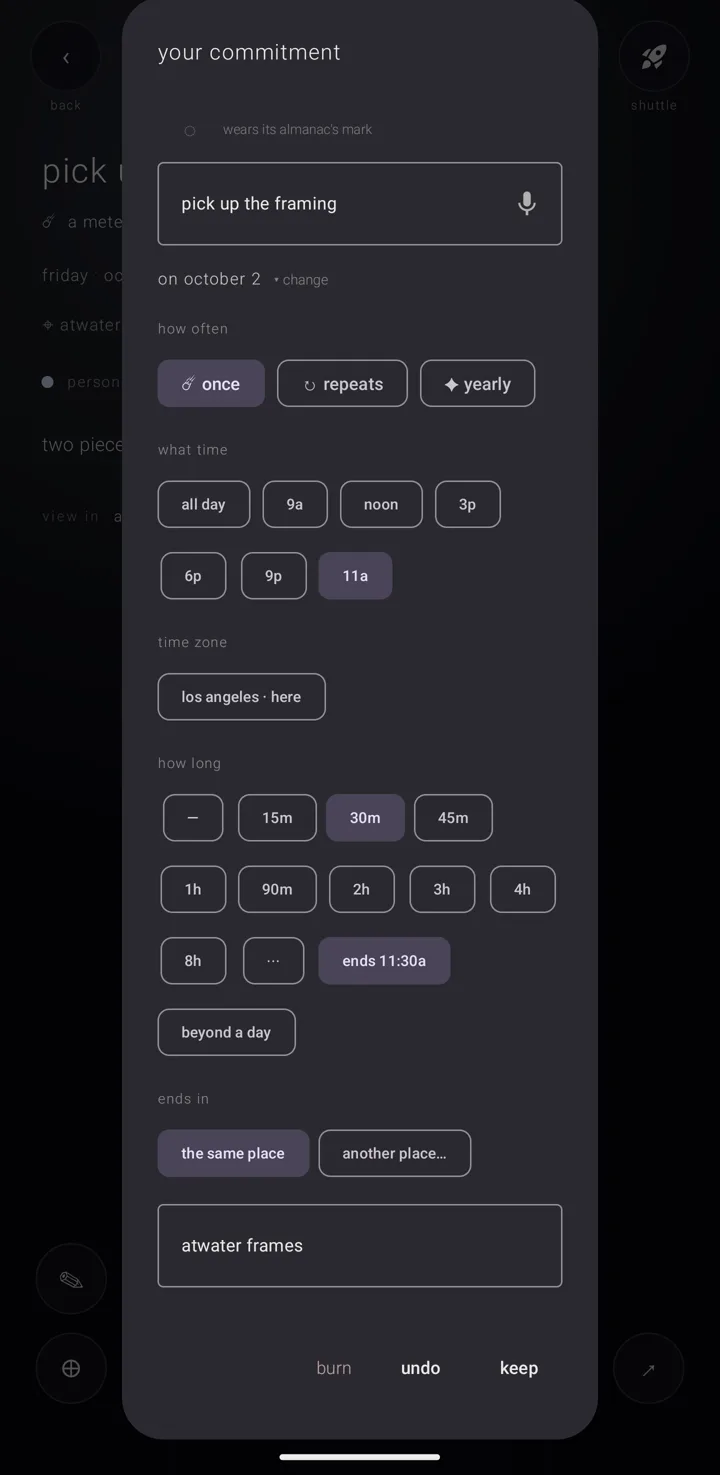
A commitment — anything on your calendar, the app's word for an event — is added on one card. Every way in opens the same card, so there is only one form to learn.
The card's heading tells you what you are doing. It reads "new commitment" while you add one and "your commitment" while you change one. When it opens over another app, it reads "add commitment", because nothing else on that screen says where you are.
Open the card
From the sky — the calendar's main screen — use any of these:
- Tap "✛", the cross that adds, in the sky's corner. The day globe beside it opens the card too.
- Hold "✛" to choose between "✛ a commitment" and "◔ an almanac". An almanac is a named, coloured layer of commitments, like one calendar among several.
- Hold a day to get the same choice, set on that day. This works anywhere on the day view, on a date in the row of dates above the week's grid, and on any cell of the month's grid, including the dim days that spill over at either end.
On the day view, if your finger was running round the rim, the card opens at the hour under the bead, rounded to five minutes. An empty day says "a quiet day · hold anywhere to add".
Two views do not answer a hold this way. On the year, a hold takes time in hand instead — see Scrubbing the ring & spinning time. The years ladder answers no hold at all. Use "✛" on both. No hold is answered while the sky is flying between views.
The card also opens from:
- "✛ place something" on tomorrow's sheet
- an almanac's own "✛"
- something shared into the calendar from another app
- a row of the shuttle — the suite's shared tray for passing things between Zenith apps
Add one from the notification shade
You can add a commitment without opening the calendar. This is free.
- Add the "Zenith Calendar" tile to Android's own quick-settings shade.
- Tap the tile. A half-screen panel opens over whatever app you are in, holding the ordinary card, set on today.
- Fill it in and place it as below.
The panel sits at the foot of the screen at first. To move it to the top, drag the short bar on its inner edge toward the other edge. This phone remembers where you put it.
To put the panel away without placing anything, tap the dimmed part of the screen or use the back gesture.
Fill in the card
- Write the name in "what happens?". This is the one thing you must write; nothing happens while it is empty.
- Or say it. Tap the microphone beside the name, labelled "say it — the sky fills it in". While your words are read, the microphone turns into "✦", the four-pointed star the sky's own work wears, and a line says "the sky is filling it in…". What comes back fills the card. Nothing is kept until you place it. > When an AI company did the reading, the card says "✦ filled by the sky — ai-generated · verify what matters", with a "⚑" — a flag. One tap on the flag reports it and it then reads "reported"; the report is written on this phone and nothing is sent. With the assistant off, or with no yes given to its consent question, nothing reaches a company: the phone's own reading fills in the name, the day and the time only, and leaves no label. See Safety, consent & your rights.
- Pick a mark if you want one. The circle beside the name holds the commitment's mark — its small picture — or "◌", an empty ring, when it has none. Its caption reads "its own mark" or "wears its almanac's mark". Tap it to open the mark picker. A letter, number, symbol, emoji or an icon from an installed icon pack is free. "◈ a picture from this phone" is Gold; until you have Gold it reads "◈ a picture from this phone ✦ gold" and a tap opens the Gold offer.
- Set when it happens. The day, "how often", "what time" and "how long" are explained in Times & repeats.
- Add a place and people if you want them. "where? (optional)" is covered in What you fill in, material & place, and "joined by" in People on a commitment.
- Choose a colour. "colour" starts with "◇", a diamond, which wears the almanac's own colour and is the way back to it. Then comes the soft palette, then "◉" for a colour wheel. The vivid half of the palette is Gold: everybody sees it, drawn dim and marked "✦", and a tap on one opens the Gold offer instead of choosing it.
- Choose the almanac. The row shows a coloured dot, the almanac's name and "▾". The list holds only almanacs that can take a commitment — never an archived one, a locked one, or a mirrored phone calendar that will not take a write.
- Add notes and a sound if you like. "notes for future you…" is free text. "sound" offers "its almanac's", "silent" or "choose…". "choose…" opens the phone's own tone picker, headed "how this one sounds"; there, "None" means silent, not cancel.
"✛ new almanac" in the almanac list makes nothing at the tap. The almanac is made only when you place the commitment, so backing out leaves no empty almanac behind. Three almanacs of your own are free; past that, the row opens the Gold offer and nothing is placed (Gold).
Place it
- "place it" saves a new commitment.
- "keep" saves a change.
- "undo" closes the card without saving.
- "burn", on a commitment you are changing, throws it away. It asks twice, and the commitment then waits in the pyre — the place thrown-away things wait thirty days — where you can still put it back. See The shelves — binder, archive & pyre.
A sound and a light buzz follow.
A few things can happen as you place it:
- A file you dropped on a day comes with the commitment as its material — files it carries. The card says "keeping it…" and then that the file came with it.
- Your very first commitment is when the app asks about reminders. See Reminders.
- One handed over by another Zenith app is linked both ways. Its page then shows a "⛓" row — a chain — naming that app.
- A locked almanac refuses before you touch a field: "“‹almanac›” is locked — unlock it first". See The lock.
On a wide screen, the card fills the docket — the panel beside the sky on a fold, tablet or wide phone — as a page instead of floating (Gold). The commitment's page stands beside it and shows what you type as you type it. That is a copy: nothing real changes before "keep".
If the app closes halfway
Switch to another app halfway through a new commitment and Android may close the calendar to free memory. What you typed is kept as you type it, on this phone only: the name in "what happens?", the notes, the day and the time. The next time the calendar opens, the card opens again on them, on that day.
- Only those four are kept. The almanac, the colour, the mark, a place or a file you chose are not, so check them before you place it.
- Only a new commitment. Changes to one you already placed are not kept this way.
- "place it" or "undo" clears what was kept.
See also.
What a commitment is · Times & repeats · A commitment's page · Widgets, shortcuts, the tile & links