The lock
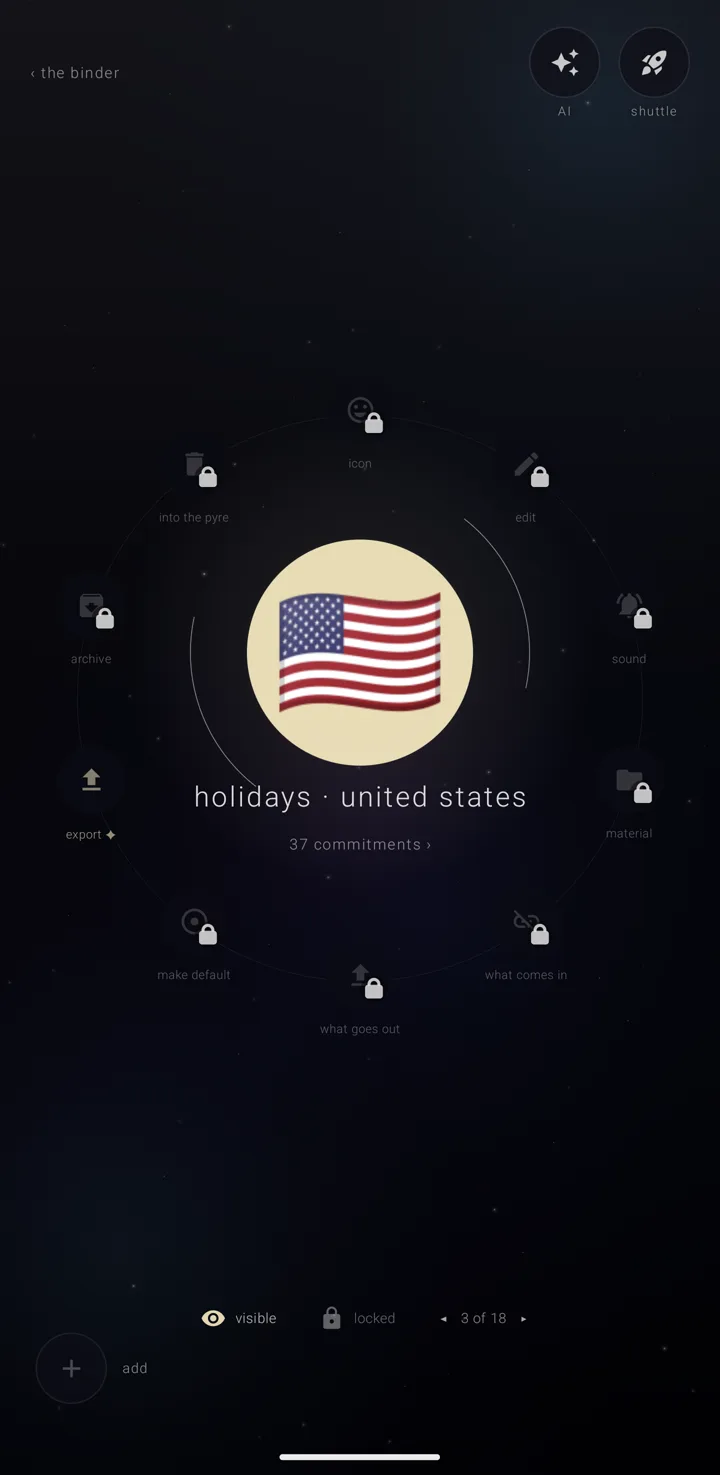
Every almanac — a named, coloured layer of commitments, like one calendar — has a lock. When it is locked, nothing about the almanac changes. Only what you look at can. It is one switch for the whole almanac, with no partial setting and no list of exceptions to learn.
Lock or unlock an almanac
- Open the binder — the screen that holds all your almanacs. On the calendar's main screen, hold the "almanacs" book in the bottom-right corner.
- Tap the almanac once to choose it, then again to open its page. See An almanac's page.
- Under its name, beside the "visible" / "eclipsed" switch, tap the lock switch: - "locked" — "everything about it is shut — tap to unlock" - "unlocked" — "open — it can be worked on"
The lit padlock is on the side where you can act, so the unlocked one is lit.
A quicker way, from the binder itself. Tap the almanac once to choose it. The strip at the foot has a padlock reading "lock" — "lock it, so nothing changes it" — or "unlock" — "unlock it, so it can be changed". It answers "“‹name›” is locked" or "“‹name›” is unlocked".
Unlocking is one tap and is never refused.
What a lock refuses
On a locked almanac, you cannot change:
- its name, colour, description, mark, the page look its commitments wear, its sound, or how much warning it gives
- its material — the files it carries
- any commitment on it: adding, editing, moving or deleting, or taking one day off a repeat
- any connection: plugging in, unplugging, pausing, writing out, carrying detail, travel, the Drive copy, or showing it to the rest of the phone
- whether new commitments land on it
- whether it is retired to the archive or brought back
- sending it to the pyre — where thrown-away things wait thirty days
- placing an arriving card on it
The assistant meets the same refusal. It cannot go around the lock.
What stays open
These stay open on purpose, so a locked almanac can still be read and the way out still works:
- "export" — saves a copy as a file. Nothing about the almanac changes, and a locked almanac is often the one you most want a copy of. Sending an almanac out is Gold — see Backup, restore & sending an almanac.
- The commitments count in the ring, which opens the list. Looking is not changing.
- The lock switch itself.
- The "eclipse" switch beside it. The lock guards your hand, not your eye.
- Moving it in the binder's order.
- Its two "ON THE YEAR" switches — see Edit an almanac.
It never stops the source
New commitments still arrive from a locked almanac's connection. A locked almanac that quietly stopped updating would be showing you something untrue.
One sentence everywhere
On the almanac's own page, a refused door says "it is locked — unlock it first".
Anywhere else, the refusal names the almanac: "“‹name›” is locked — unlock it first". You see the same words from the legend chip's menu, the "edit this almanac" dialog, a commitment's page, an arriving card, and the assistant. One sentence everywhere reads as one closed thing, not ten different problems.
How to tell before you tap
- On its page: nine of the ten doors are greyed with a small padlock. The source switches are struck through.
- In the binder: a locked almanac has a bracket on each side of its body, and the line at the foot says "locked".
- The binder's "key" sheet explains it: "brackets" means "locked — nothing on it can be changed".
The almanacs that come with the app
The almanacs the app comes with arrive locked: the sixty-two holiday almanacs, "celestial" and both astrology almanacs. Of the demo almanacs, two arrive locked; the rest arrive unlocked. That is why one you left off on "your starting sky" has to be unlocked before you can put it back from the archive. Unlock one and it is an ordinary almanac — rename it, recolour it, add to it, retire it, send it to the pyre. See Holiday almanacs and Sky & astrology almanacs.
The one thing a lock does not decide
The calendar always keeps one almanac. Your last almanac cannot be deleted from any door, locked or not, including by the assistant. See The shelves — binder, archive & pyre.
"remove demo content" on the binder's settings takes every demo almanac, the locked ones too, without asking you to unlock them. The lock guards against changing an almanac by accident; this is the app taking back its own demo. See The binder's settings.
See also.
An almanac's page · The shelves — binder, archive & pyre · Holiday almanacs · What an almanac is