The day view
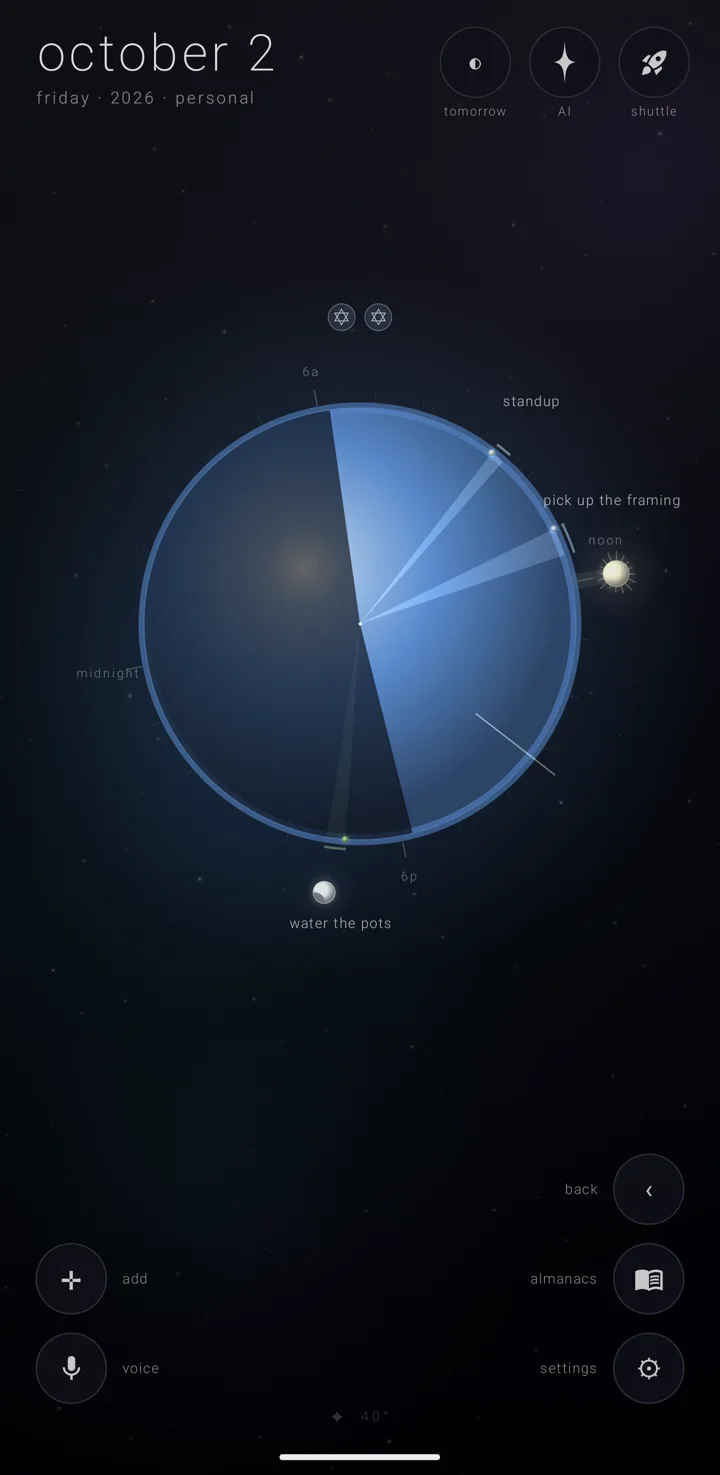
The day view draws one day as the earth itself, read like a clock.
Getting here
- Dive into today's earth from the year view — the animated move where the camera flies into the body you touch. You can also dive into the ghost earth, the faint earth at any day you have picked.
- Tap a day in the month view twice.
- Tap "daily" in a brief's "view in" row.
The sun, the moon and the night
The sun hangs at the same bearing it holds in the year for this date, so stepping in from the year never moves it. A faint shaft of light runs along that bearing.
The moon sits at its true place for the date, at its real phase, its lit edge aimed at the sun.
The sun is the door back to the year. The moon is the door to the week.
The dark side of the globe is the real night for this date where you are. When the app does not know where you are, it uses 40° north. The first time you enter the day view without a known location, it asks for location then — once, on the way in. See Privacy, permissions & what leaves the phone.
The dial
Twenty-four hour ticks ring the globe. Every sixth one is longer and labelled "midnight", "6a", "noon" or "6p" — or "0:00", "6:00", "12:00" and "18:00" with the 24-hour clock on. See Time & directions. Noon points at the sun and midnight away from it.
Neither the sun nor the moon ever sits on an hour word. "noon" steps sideways along the dial until it is clear. A word the moon's disc would cover steps up or down out of the way.
The one thing that turns is the hand — your time zone's mark on the earth's edge, breathing gently, turning on the earth's centre. At local noon it points straight at the sun. See Time zones.
Riding the rim
- Put your finger on the globe, or on the row of all-day marks above it.
- Run it round the globe's edge. A bead rides the rim under your finger, with a short wash of light either side. The hour it stands on is written right outside, as "4:05p" — or "16:05" with the 24-hour clock on.
- Pass within about half an hour of a commitment's time, and that commitment takes the brief. Sweep empty sky and the brief falls back to the whole day.
- Lift your finger to end it. The bead fades.
You feel the rim the whole way, harder near a commitment. Arriving on one plays a note pitched from its hour, with a firmer bump.
Paging days
A one-finger drag that starts anywhere else pages through the days. The globe, the sun and the moon all lean a little with your finger. On release, the day moves by one for each short swipe, with a note pitched from the weekday it lands on.
Which way is next follows the direction you pull. It reverses while "reverse the earth's spin" is on. See Time & directions. If the drag turns into riding the rim, nothing pages.
Timed commitments
Timed commitments tint their hours of the globe, like slices of a pie. One with a stated length sweeps its hours. One with no length still gets a sliver.
They also sit as dots on rings round the globe. Those that overlap in time take rings further in, with the earliest outermost. One with a length draws an arc.
Their names never sit on each other and never across the moon. A name that would land on one already drawn moves further out along its side of the dial until it is clear.
All-day commitments
All-day commitments are a row of marks above the earth, never a ring round it. Each wears its own mark — its picture, else its glyph, else its almanac's, else the first letter. Drag a finger along the row and the one under it is named above it.
What the eye puts away
The eye, "view", stands here as on every view. A kind of repeat it is putting away is not on the globe or in the row of all-day marks. It cannot be tapped or met by riding the rim either. See The eye — putting repeats away.
Zenith Tasks' stars
While the eye's "tasks" pill is on, the day shows the stars Zenith Tasks has given a due date.
- A timed star sits at its time on a ring of its own, inside the commitments' rings. It is Tasks' four-point star rather than a dot, and its name is placed clear of the others.
- An all-day star stands at the end of the row of all-day marks, a four-point star in a plain ring.
- A done star is dimmed and crossed out.
Tap a star to open it in Zenith Tasks.
Taps
A mark above the earth, or a dot on the globe, opens that commitment in the brief — the picked day's list along the bottom. A Zenith Tasks star opens in Zenith Tasks instead.
Here, and only here, a focused brief row gives its place, who joins it, its almanac, and up to six lines of its notes, each on a line of its own. See The day brief.
Adding a commitment
An empty day says "a quiet day · hold anywhere to add". The line drops below the moon on days when the moon's disc would cover it.
Hold anywhere to start a new commitment. If you are riding the rim, or were a moment ago while the bead is still fading, it opens at the hour under the bead, rounded to five minutes.
The cross ✛ in the bottom-left corner does the same. So a second finger on ✛ while the first rides the rim keeps that hour. See Add a commitment.
Nothing on screen mentions the dial or paging. The bead and the hour beside it are all the app says.
See also.
The week view · The day brief · Time zones · Time & directions