Reminders
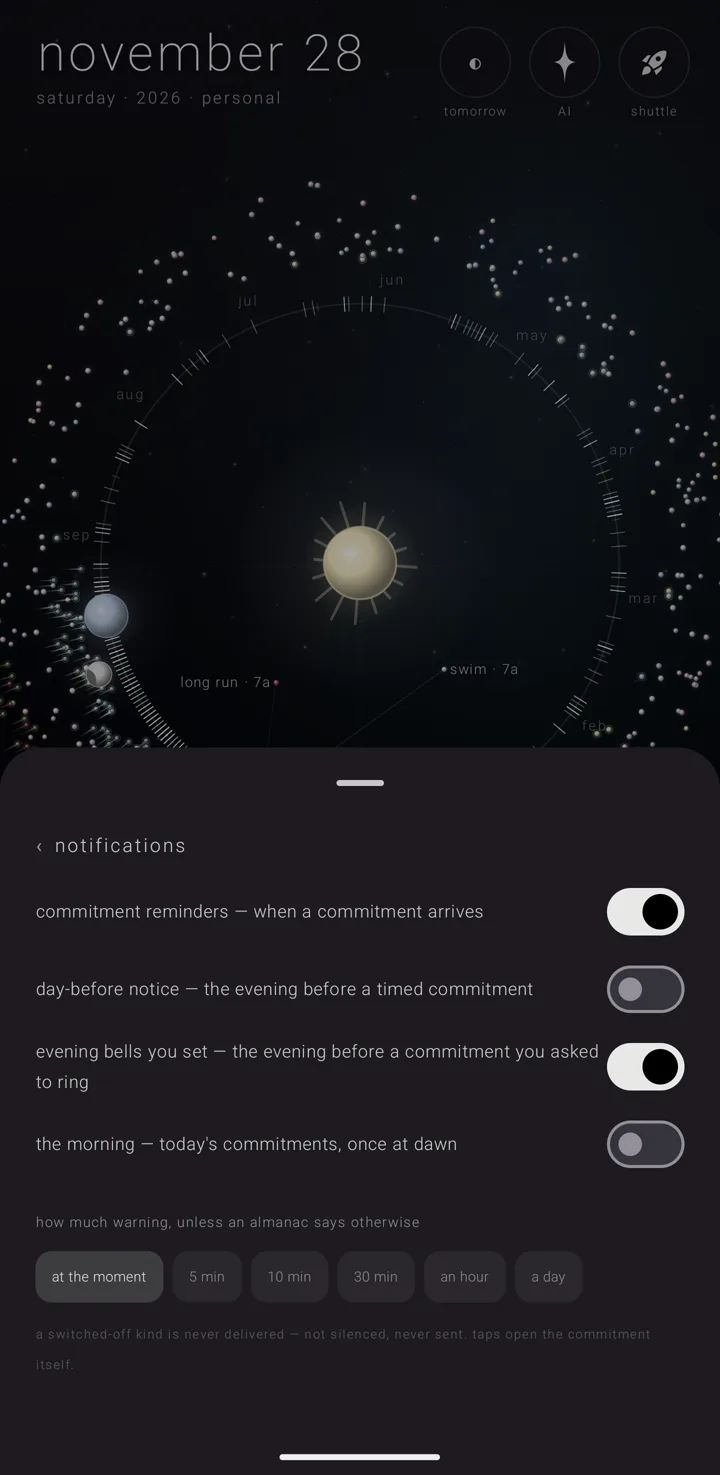
Zenith Calendar rings its own reminders, both for its own almanacs — named, coloured layers of commitments, like separate calendars — and for the phone's calendars. It does not hand the ringing to the phone's alert app, which is often the app you have quieted.
Open the reminder settings
- Hold the gear ⚙ in the bottom-right corner of the sky. This opens the settings book. (A plain tap opens quick settings instead — see The settings book.)
- Tap settings › "notifications".
An almanac's own answers about ringing live on that almanac's page, behind its "sound" door.
Choose which kinds ring
The page lists nine kinds, each a switch:
| Switch | Starts |
|---|---|
| "commitment reminders — when a commitment arrives" | on |
| "day-before notice — the evening before a timed commitment" | off |
| "evening bells you set — the evening before a commitment you asked to ring" | on |
| "the morning — today's commitments, once at dawn" | off |
| "the afternoon — says what you chose on settings › the morning" | off |
| "the evening — says what you chose on settings › the morning" | off |
| "the night — says what you chose on settings › the morning" | off |
| "your own announcements — the ones you add on settings › the morning" | off |
| "journal after — when a commitment you marked to journal about ends" | on |
Once you switch "day-before notice", "the morning" or another announcement on, it stays on. The app never turns it back off for you.
These names stay the same even when you rename an announcement. Under the switches, one line says where the rest is set: "when the morning, the afternoon, the evening, the night, the day-before notice and your own announcements come, and what each says, is set on settings › the morning". See Announcements.
"journal after" is the notice for a commitment you marked "remind me to journal after" in its "⊕ expand" — the sheet that adds more to one commitment. That switch shows only while Zenith Journal can take a commitment. When the commitment's time ends, a notice reads "journal about ‹title›", with "it has ended · tap to write about it in the journal · zenith calendar". One with no time rings the morning after its last day, at the morning's time. A tap hands it to Zenith Journal. If the commitment is gone, the app says "that commitment is no longer on the calendar". If the Journal can't take it, the commitment's page opens on that day. See What you fill in, material & place.
The foot of the page explains: "a switched-off kind is never delivered — not silenced, never sent. taps open the commitment itself."
On a locked screen, only the app's name
Every kind is private on a locked screen. A locked screen that hides private content shows only "Zenith Calendar" and the star — never the title, the time, the place or the names. How much any phone shows also follows the phone's own lock-screen setting. Tapping the notification still opens the right place once the phone is unlocked. There is no switch for this.
The morning and the evening notices are on The morning, the evening bell & tomorrow. The other announcements — the afternoon, the evening, the night and your own — are on Announcements.
Set how much warning you get
- In settings › "notifications", find "how much warning, unless an almanac says otherwise".
- Tap one of six chips: "at the moment", "5 min", "10 min", "30 min", "an hour", "a day". It starts at "at the moment".
Every reminder already set moves to match, right away.
Let one almanac answer differently
- Open the almanac's page and tap its "sound" door.
- Under "how much warning", choose an answer.
"as the app does" follows the app setting wherever you move it. "at the moment" is an answer in its own right. It keeps meaning the moment itself, even after you set the app to half an hour. For the rest of that door, see An almanac's page.
What rings, and when
- One reminder per commitment per day. The app sets reminders for today and the next thirty days.
- Only timed commitments get the moment itself. A commitment — one thing you have to do — with no time has no moment to ring at.
- Clock-change days ring on time. The time is read off that day's own clock.
Exact, or within ten minutes
Each reminder rings exactly where the phone allows exact alarms. Where it does not, it rings within a ten-minute window.
The window only happens if you have switched the phone's "Alarms & reminders" setting off yourself. Switch it back on, and every reminder is set exactly again.
When there are too many
Android limits how many alarms one app can hold. The app sets the nearest first, so if it reaches the limit, it is the far future that waits — never tomorrow morning. When that happens, the page says: "N commitment(s) in the next month are past the number of alarms android lets one app hold. the nearest ones ring; these do not, until something closer passes."
If the phone is blocking notifications
The page checks with the phone each time it opens. If notifications are not allowed at all, an amber line stands at the top: "this phone is not letting zenith calendar notify you at all — nothing below will arrive until you allow it · tap to open the phone's own page for this app". Every switch that reads on also says "· the phone is blocking this".
- Tap the amber line.
- Allow notifications on the phone's page for the app.
Switching a kind on also asks the phone for permission, if it has not been given yet.
What a reminder says
- The title is the commitment's title, in lowercase.
- The body gives how far ahead it is, the time, the place and who is joining — each only when there is one — joined by " · " and ending " · zenith calendar". Examples: "in 5 minutes", "in an hour", "tomorrow", "with ana & leo". At the moment itself, it says "now".
- A tap opens the commitment's page on the day it rang for.
Before posting, the app checks the commitment is still on the calendar, on that day, at that time. A reminder never rings for something you moved or threw away.
Choose the tone
The tone is picked in this order:
- The commitment's own chosen tone.
- Failing that, the tone set on its almanac's "sound" door.
- Failing that, the app's default.
"silent" means no sound at all. That is not the same as choosing nothing.
Android keeps each sound on its own notification channel. So each tone you choose adds one row under this app in Android's own settings, and changing it there wins. Two almanacs with the same sound share one row.
When reminders update
You never need to refresh them. Reminders are rebuilt whenever anything could change their meaning:
- any change to the calendar — the editor, speaking, a file, Drive, or the sky's own assistant;
- opening the app, leaving it, and coming back;
- the phone restarting;
- a time-zone change;
- the clock being set by hand or by the network;
- the app being updated;
- "Alarms & reminders" being switched back on.
So an edited commitment rings at its new time without closing the app. A thrown-away one stops ringing. And stepping off a plane does not leave a month of reminders ringing on the old country's clock. See Time zones.
See also.
The morning, the evening bell & tomorrow · An almanac's page · Troubleshooting · Sound across the suite