The year & the years
The year
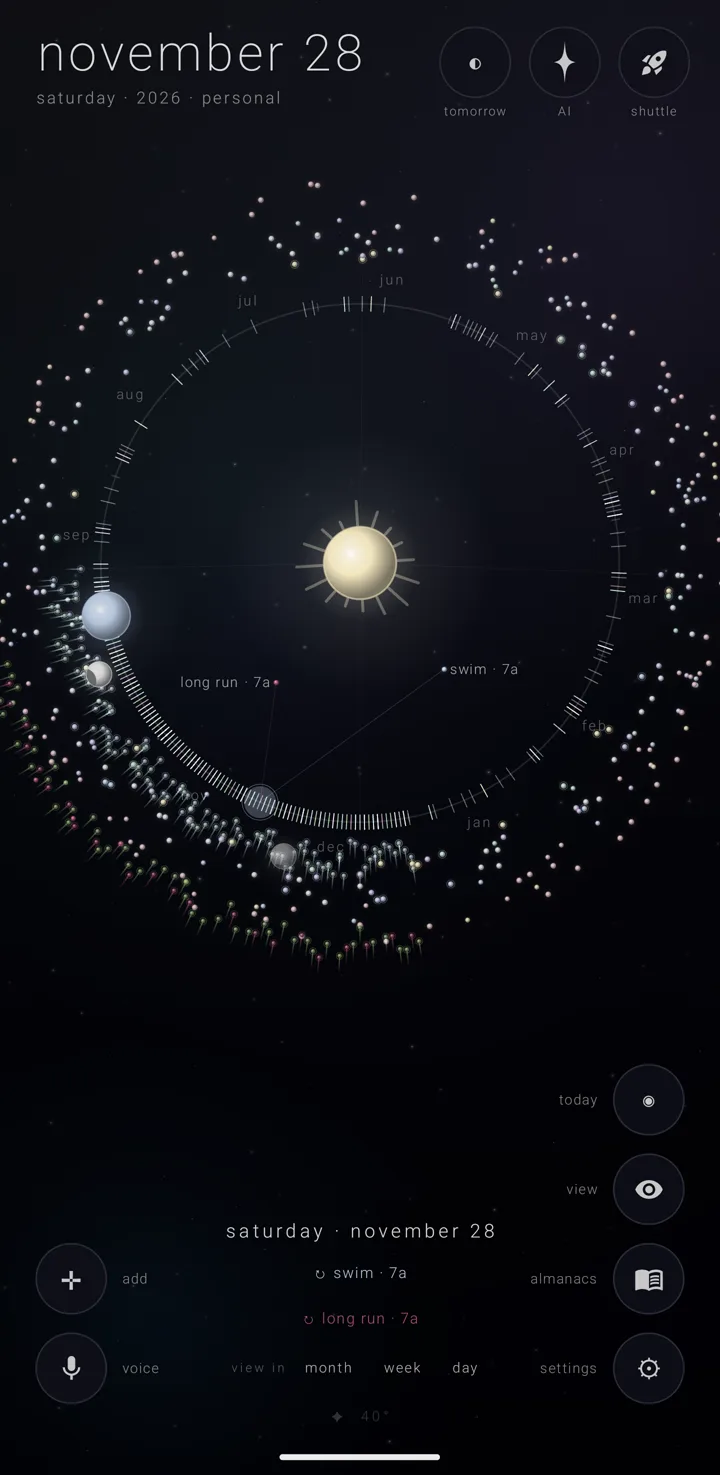
The year view is home. It shows the whole year as the orrery — the app's working model of your year, with the sun, the earth and the moon — seen face-on. It is the first of the five views, and the app opens here.
Three things bring you back to it: the ringed dot ◉, "today", in the bottom-right column; a tap on the big date; or a double-tap on the background.
What stands on it
- The sun at the centre.
- The year ring round it, ticked where each month of the chosen calendar system begins.
- Every almanac's belt of bodies outside the ring. An almanac is a named, coloured layer of commitments, and each one shows one body a day.
- Today's earth and moon, drawn live only while the current year is showing.
- A ghost earth — a faint earth with a dimmer moon beside it — at any other picked day, or in another year. Both are doors, so a year you have travelled to still has a way into a day and a week.
On a body, a tail means something happens at a set time that day, and a ring means it comes back. The picked day's bodies are drawn a little larger. See The orrery and What a commitment is.
The fan
The fan is the picked day's commitments, spread out toward the sun.
They leave their almanac's body outside the ring, come in to the day's own point on it, and open out along their own ribs toward the sun. Each is a dot with its name, and its time if it has one.
- Order. The earliest is always the highest dot, on every side of the ring. All-day things come first, then by start time, then in the binder's order of almanacs, then by title.
- Room. What the fan cannot hold is clipped, latest first. A name that would lie on top of one already written waits until its own dot is lit.
- Staying open. The fan stays open after your finger lifts. It folds back when another day is picked or the view changes.
- Empty days never fan, and so never sound.
- Only the face-on year fans at all.
- Zenith Tasks' stars never swing in. The fan holds the day's commitments only.
Whether an almanac's commitments swing into the fan is that almanac's own choice. It has one switch for its day's commitments and another for its all-day ones. The almanacs the app ships with start with the first switch off. See Edit an almanac.
Two sliders in settings › the sky set how long a dragged finger rests before the fan opens, and how long the swing takes. See Skies, colours & my sky. With "reduce motion" on, the fan appears without the swing.
Scrubbing the ring, and the time spin
Run a finger along the ring to pick each day of the year in turn, and sweep inward to read that day's fan. Hold today's live earth and carry it round the orbit to roll the calendar a year at a time — the only gesture that moves the year. Both are walked through in Scrubbing the ring & spinning time.
Hovering the open sky
Drag a finger through open space, away from the ring, and it reads the bodies it passes. The nearest body picks its whole day, opening that day's brief and its fan.
Pinch and pan
Pinch to zoom and pan with two fingers — here and nowhere else. Zoom runs from 0.6× out to 3×, and the room to roam grows with the zoom.
One finger does none of it. One finger taps, scrubs, hovers and leaves a comet trail. A second finger clears the trail and ends any scrub.
With my sky on (Gold), three fingers move the stars instead, in every view: pinch or spread to zoom them, drag to pan, twist to tilt, and double-tap with three fingers to bring them back to where they started. A touch that becomes three fingers presses nothing and moves no day. See Skies, colours & my sky.
Words keep their set size while the drawing grows. A touch's reach shrinks with the zoom, so a body is the same size under your finger as it looks.
A double-tap puts zoom and position back, and comes home to today.
Holding adds nothing here
On the year, holding the earth spins time and holding the ring scrubs it. To add a commitment, use the cross ✛ in the bottom-left corner. See Add a commitment.
The brief and the eye
The brief — the picked day's list — runs to the foot of the frame in this view, clearing only the weather line. Its list grows upward and stops below the field of bodies. See The day brief.
The eye, "view", stands here, as on every view. It puts repeating commitments out of sight, and what it puts away here is away from every view. See The eye — putting repeats away.
Zenith Tasks' stars
While the eye's "tasks" pill is on, each day holding a star Zenith Tasks has given a due date shows one small four-point star just inside the ring. It covers the year on screen, or the next 365 days with "next 365 days" on. It is dimmed and crossed out when every star that day is done.
A tap on one picks that day and opens its brief, as a body does. The stars are listed in the brief, and each opens in Zenith Tasks from there.
Nothing on screen mentions the ring scrub, the hover, the time spin or the pinch.
The years
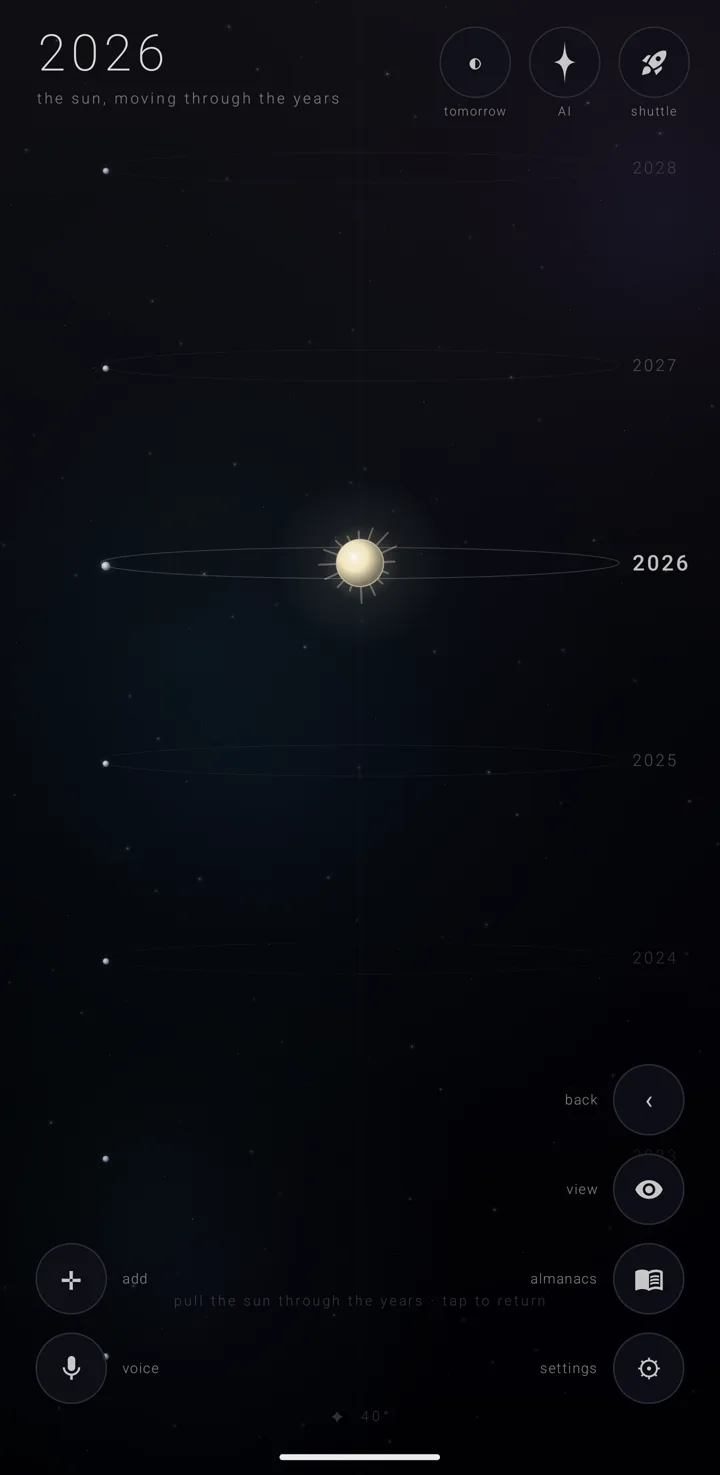
The years view is the year ring tipped on its edge, with a ladder of years stacked up and down the screen. Its title reads "the sun, moving through the years". It and the face-on year are one drawing, which turns smoothly from one into the other.
Getting here. Tap the sun in the year view — anywhere within a fifth of the ring's radius of the centre. The app also carries a launcher shortcut, "the years". See Widgets, shortcuts, the tile & links.
The ladder. Eight rungs. Each is one year's ring seen edge-on, with that year's earth on it at the same season, and the year's name beside it. The middle rung is brightest, and the rest fade with distance.
With another calendar system chosen, each rung is named in that system. Where a name is too long for the right edge — "1448 ah", "heisei 31 · reiwa 1" — every rung's name moves to the left of the rings.
The title and hint. The title is the year in large type, then "the sun, moving through the years". The hint at the foot reads "pull the sun through the years · tap to return".
Moving and leaving.
- Drag up or down to move the sun through the years, between 1900 and 2200. With a calendar system other than gregorian, the range is the span every system is built and checked to.
- Any tap returns to the year view, on the year shown. So does back.
- The ladder answers no hold.
The eye, "view", stands here too, as on every view, and what it puts away is away here too. Zenith Tasks' stars fade out as the ring tips onto its edge, so the ladder shows none.
See also.
Scrubbing the ring & spinning time · The eye — putting repeats away · The orrery · Calendar systems & names