The binder's settings
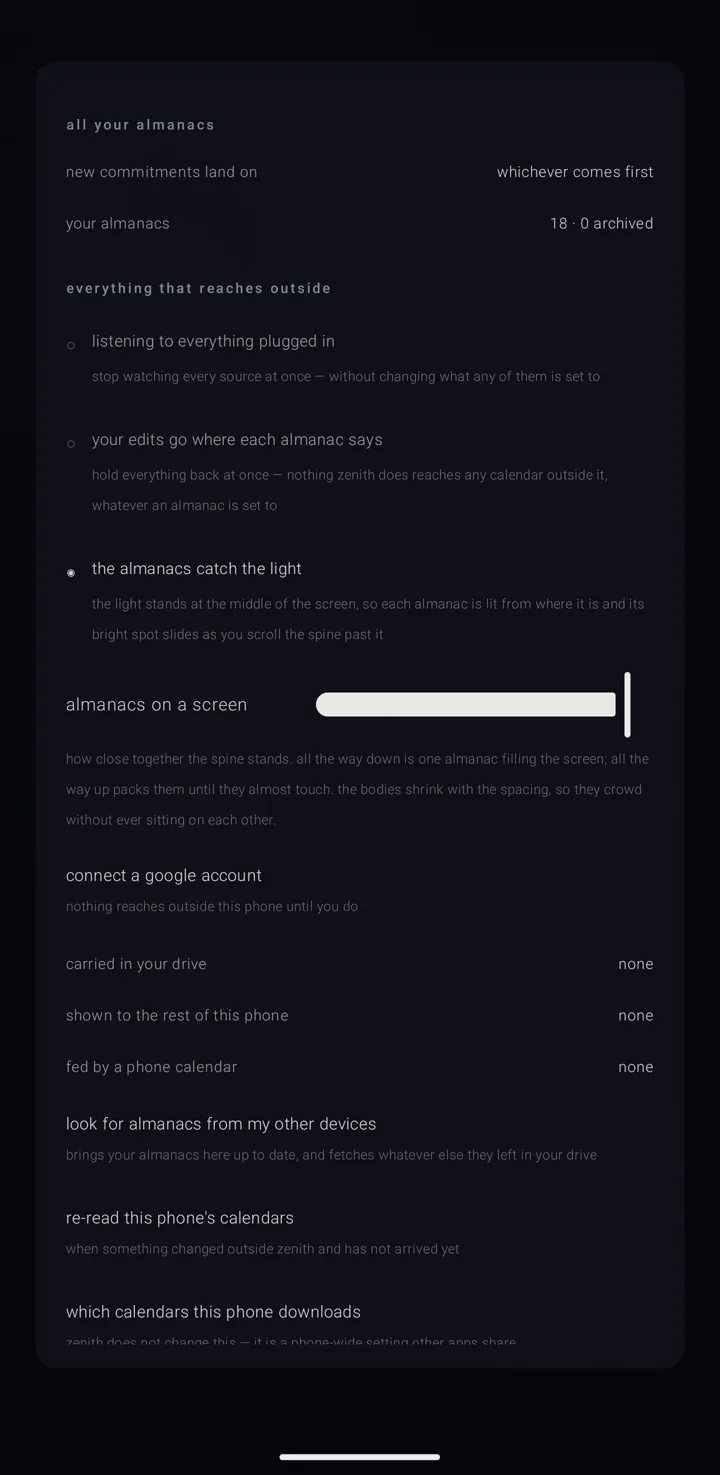
Some settings are true of every almanac at once, or reach outside Zenith. They live on one panel in the binder — the screen that holds all your almanacs — not in the settings book. An almanac is a named, coloured layer of commitments, like one calendar.
Where it is
In the binder, bottom-right corner, tap "settings", the gear ⚙, labelled "all of them". The panel is headed "all your almanacs". A hold on the same gear opens quick settings instead.
Tap outside the panel, or use the back gesture, to close it. The binder stays open.
"all your almanacs"
"new commitments land on" names the almanac a new commitment goes to when you do not choose one. It reads "whichever comes first" when none is chosen. The panel only reports this; you set it elsewhere:
- from a legend chip's menu, "◉ make default" — see What an almanac is
- from an almanac's page — see An almanac's page
- from the "edit this almanac" dialog — see Edit an almanac
If that almanac is later locked, archived or unplugged, Zenith falls back to the first almanac that can take a commitment, preferring one not fed by a phone calendar. There is always somewhere to put a new commitment.
Under it, "your almanacs" counts them: "‹n› · ‹m› archived".
The demo
Under "your almanacs" is one row for the app's demo content — almanacs already filled in, to look around in.
- "add demo content" — "almanacs already filled in, to look around in · they never count toward your three" — stands there while no demo almanac is here. A tap adds every demo almanac that is not here yet, each exactly as it ships, and says "demo content added · ‹n› almanac(s)". Each lands at the end of the binder's spine, except the one that arrives on the archive shelf.
- "remove demo content" — "deletes the demo almanacs and everything in them, at once" — stands there instead while any demo almanac is here. A tap asks first: "remove the demo content?", naming each one and saying "they do not go to the pyre, so it cannot be undone. nothing else is touched." Tap "remove it" or "never mind"; going back is "never mind".
"remove it" deletes every demo almanac and everything in it — anything you added to them included, their files and pictures too — and says "demo content removed · ‹n› almanac(s) and everything in them". They do not go to the pyre, the place where thrown-away things wait thirty days, so nothing waits to be pulled back. Locked demo almanacs go too, archived or not. Nothing that is not a demo almanac is touched. If the demo is all there is, a blank "personal" is made first, because the calendar always keeps one almanac.
A demo almanac never counts toward the three almanacs you can make for free. A copy of one you send to somebody is theirs, and counts there.
"everything that reaches outside"
Two switches. They are overrides, not bulk edits: they change nothing on any almanac. They change only what happens at the moment of acting, which makes both safe to turn off again.
- "nothing is coming in" (on) / "listening to everything plugged in" (off) — "stop watching every source at once — without changing what any of them is set to". This does not hold your edits back; that is the next switch. What has already arrived stays in its almanac, and each almanac keeps its own setting for when you turn this off. Off by default.
- "nothing leaves this phone" (on) / "your edits go where each almanac says" (off) — "hold everything back at once — nothing zenith does reaches any calendar outside it, whatever an almanac is set to". Turning it off does two things: what was held back goes out now, and the app says so; and the almanacs kept in your Drive are pushed up. Off by default.
Both are also in quick settings — hold the same gear — as "nothing comes in" ("stop watching every source") and "nothing leaves this phone" ("hold back every edit"). These are the same settings, not copies.
How the binder is drawn
"the almanacs catch the light" (on) / "the almanacs are flat discs" (off). With the light on, each almanac wears a bright spot that makes it read as a sphere. The light stands in the middle of the screen, so the spot slides round each disc as the spine scrolls. Off, an almanac is its colour and its mark and nothing else. On by default. It changes only how the binder looks.
"almanacs on a screen" is a slider that counts almanacs. All the way down, one almanac fills the view. All the way up, fourteen stand packed close together. The bodies shrink as they crowd, so they never overlap and every row stays easy to tap. The default is a little under seven.
Reaching outside
- "connect a google account" — "nothing reaches outside this phone until you do". Once linked, it reads "connected as ‹account›". See Connected accounts & Drive sync.
- Three counts, each "‹n› almanac(s)" or "none": "carried in your drive", "shown to the rest of this phone" and "fed by a phone calendar".
- "look for almanacs from my other devices" — "brings your almanacs here up to date, and fetches whatever else they left in your drive". It looks in your Drive only. Zenith never opens a calendar nobody has attached to an almanac. While it looks, it says "looking in your drive…". Then it lists each almanac waiting, with its name and count, and "make it an almanac" beside it — "it keeps who it is — the same almanac as on your other device". Each one you make counts toward the three almanacs that are free — except a demo almanac, which never counts.
The phone's own calendars
- "re-read this phone's calendars" — "when something changed outside zenith and has not arrived yet".
- "which calendars this phone downloads" — "zenith does not change this — it is a phone-wide setting other apps share". It opens the phone's own sync settings, or says "this phone has no sync settings screen".
More on phone calendars is in Travel & the phone's own calendars.
Bringing in an almanac from a file (Gold)
"bring in an almanac from a file" — "a .zca, a .zen of material, or a zip holding both". This is Gold. The row shows "✦", a four-pointed star, until you have Gold. The Gold feature it needs is "sending an almanac", which covers one almanac as a file in either direction. See Backup, restore & sending an almanac.
See also.
The binder · What comes in, what goes out · Connected accounts & Drive sync · Backup, restore & sending an almanac