Backup, restore & sending an almanac
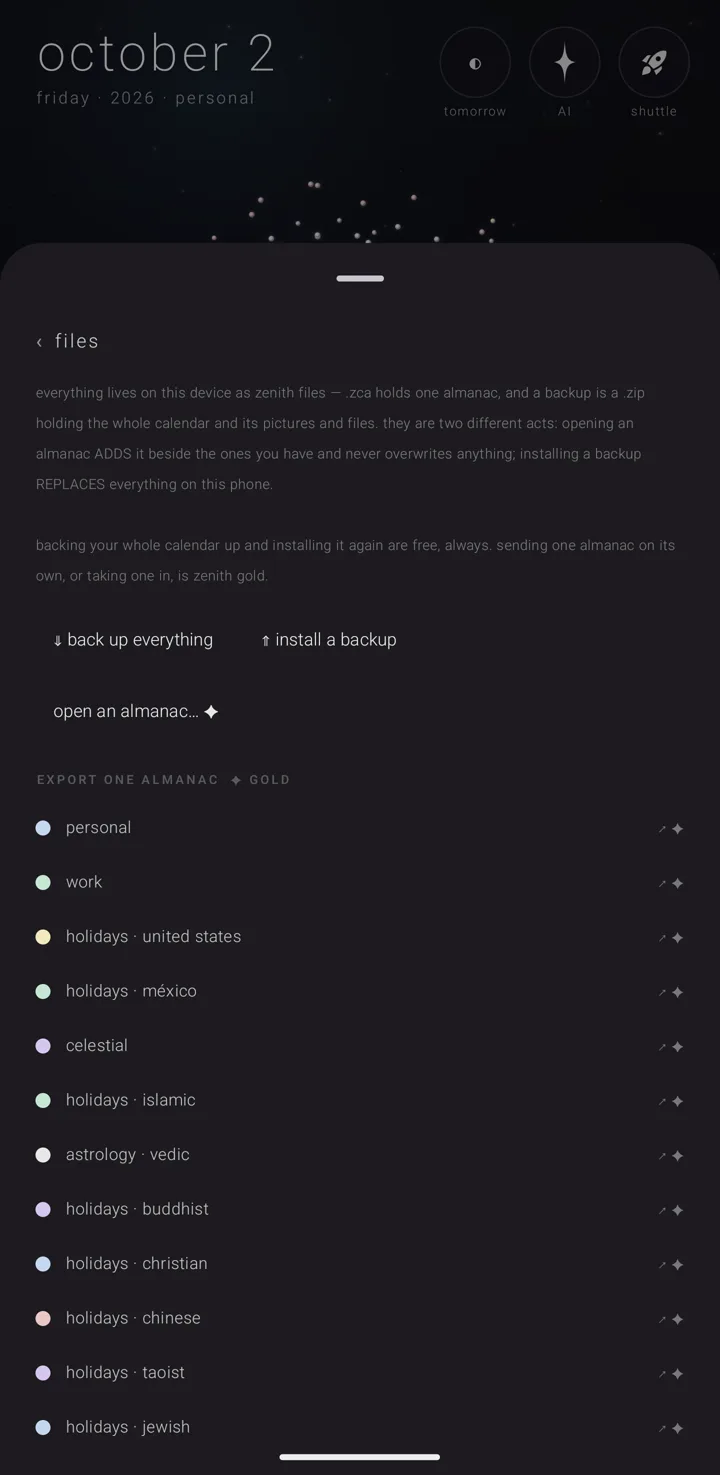
Backing up your whole calendar is free. So is installing a backup again. Sending one commitment out as a card is free too. What Zenith Gold opens is sending an almanac — one almanac (a named, coloured layer of commitments, like one calendar) out as a file, or one taken in from somebody else.
The page says it in its own words: "backing your whole calendar up and installing it again are free, always. sending one almanac on its own, or taking one in, is zenith gold."
Where it is
- Hold the gear ⚙ to open the settings book, then tap settings › "files". Its row is lined "save · export · back up · restore".
- An almanac's own page carries the "export" door. You reach a page through the binder — where every almanac lives. See The binder.
Back up everything (free)
A backup is the whole calendar: every almanac, every commitment, your settings, and the files and pictures they carry.
- In settings › "files", tap "⇓ back up everything". The ⇓ is a double down arrow.
- Choose a folder, not a file name.
- The backup is written into that folder — by default as one zip.
It asks for a folder because a backup has two halves: a document, and one pack holding the files and pictures. The halves must not arrive separately.
Zenith Tasks' stars are not in it. The calendar only shows them; they belong to Zenith Tasks, which keeps its own. See The eye — putting repeats away.
Install a backup (free)
Installing a backup replaces everything. (Opening one almanac, by contrast, adds.)
- In settings › "files", tap "⇑ install a backup". The ⇑ is a double up arrow.
- Pick the backup. It is read and checked before anything is asked.
- It asks "replace everything?". It tells you how many almanacs and commitments the backup holds, and how many are on the phone now. It warns that "it cannot be undone".
- Tap "replace everything", or "never mind" to stop.
Nothing is written to or deleted from your Google or phone calendars. A restored almanac arrives as a Zenith one. If you want a calendar to feed it again, link it from the almanac's page. See Travel & the phone's own calendars.
What a restore cannot bring back
The restore tells you about the files and pictures in one of four sentences:
- the material came with it, and how much;
- a pack was beside it but belongs to a different backup, so it is not used;
- the material is not with it — the calendar, commitments and settings come back, and the files and picture marks wait until that pack is opened; or
- this backup carries none, because the calendar it came from had none.
A missing pack never stops the restore.
If any almanac is fed by an account's calendar, the page warns you before you press the button. That almanac keeps only its own commitments here and must be linked again after a restore. What you added to that calendar's entries comes back on this phone only.
Send one almanac (Gold)
The marks tell you before you tap. Without Gold:
- the heading reads "EXPORT ONE ALMANAC ✦ GOLD" — the gold spark ✦ marks what Gold opens;
- each almanac's row offers "↗ ✦" instead of "↗ almanac" (↗ is an out-arrow);
- the way in reads "open an almanac… ✦";
- an almanac's own door reads "export ✦", under "save it out as a file".
With Gold, a second word sits beside each row: ".ics". It saves the same commitments as a plain calendar file any app can open. Whatever that standard has no word for is left out.
From an almanac's page
- Open the almanac's page and tap "export".
- The sheet reads "send “‹name›” out as", with three ways: - "the almanac" — "one zenith file · everything it means, no books". - "onto the shuttle" — "one zenith file, ready to drag into another zenith app". The shuttle is the one tray every Zenith app shares. The almanac and its files cross as separate items. See The Shuttle. - "just the commitments" — "a plain calendar file for somebody without zenith — loses their kind, rule and colour".
- Choose one.
If a calendar an account keeps feeds the almanac, the sheet tells you first. A Zenith file carries only the almanac's own commitments. The plain calendar file carries both.
Saving its material (Gold)
If the almanac carries material — files attached to it — a naming step follows, headed "save “‹name›”".
- Give the file a name. The name is what holds the two halves together.
- Check the actual filenames and how much lands in the folder. You see this before anything is written.
- Pick how the material goes: - "without materials" — "the almanac alone — its material stays on this phone". - "with .zen" — "easiest to open — the almanac finds its material beside it". A .zen is a pack of the almanac's files. - "remote .zen" — puts the pack on your own Google Drive, and the file carries a link to it, so "anyone who receives the file can open those materials".
- To pick which files go, tap "audit material…". It opens "WHAT TO INCLUDE", with everything ticked, "all" and "none", and each file's size.
- Tap "choose a folder". It is one folder, not two save boxes, so the halves cannot end up apart.
"remote .zen" needs a linked account. Without one it says "remote .zen needs a google account — connect one in settings › connections". See Connected accounts & Drive sync.
The app never says "saved" unless the files were actually written.
Taking an almanac in (Gold)
This is the same Gold, seen from the other end. See Arriving files & shares.
Locked almanacs can still be sent
Every other door on a locked almanac's page closes. The send door stays open. Locking the almanac you care most about is exactly when you want a copy of it. See The lock.
See also.
Arriving files & shares · Zenith Gold in the calendar · Share a commitment · An almanac's page