The day brief
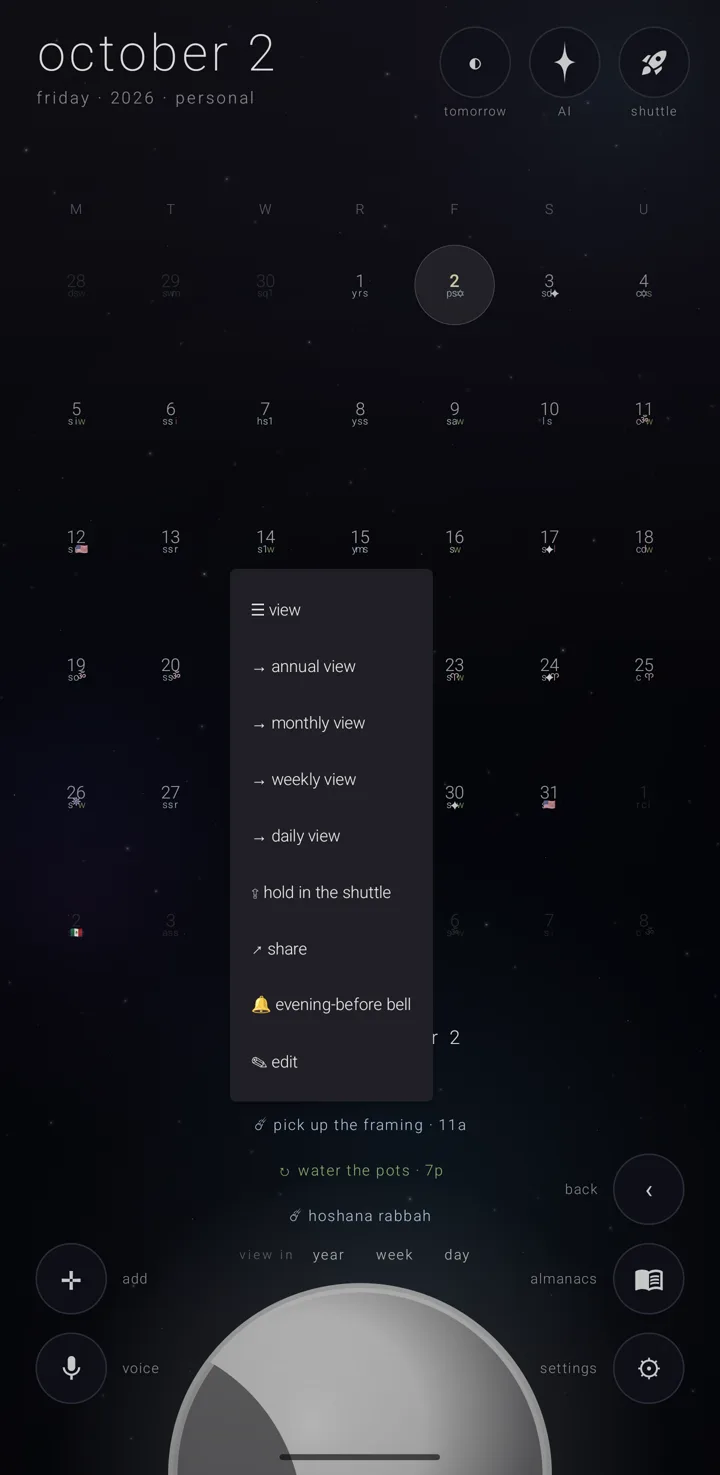
The brief is the picked day's commitments, written as plain words in space at the bottom of the screen. It appears in every view. A commitment is one thing you have to do.
When it shows
The brief is pinned — it appears when you scrub or tap a day, and stays. It goes away on a new scrub, a change of view, or a double-tap on the background.
The header
The header reads "friday · september 18". When the day is not in this year, " · ‹year›" is added. The day number always stays with its month name, so it is never left alone on a line.
With another calendar system chosen, the header shows that system's date, with the gregorian date small underneath. A long date takes a second line between the corner buttons rather than running under them.
A day with nothing on it says "a quiet day". A day holding only Zenith Tasks' stars is not a quiet day.
The rows
Each row starts with the commitment's form, drawn as its glyph:
- the meteor ☄ — happens once
- the asteroid ↻ — keeps coming round
- the fixed star ✦ — returns every year
Then comes its title, then " · ‹time›" if it has a time. The row is drawn in its almanac's own colour. See What a commitment is.
- Tap a row once to focus it. It grows " ⓘ", an encircled i, and shows its full time span. A span that runs past one day says the day it ends on — "6p – sep 24 · 2p". An all-day commitment of several days reads "until ‹day›".
- Tap the focused row again to open the commitment's page, which takes over the screen. See A commitment's page.
- Hold a row for its menu.
Nothing on screen tells you rows can be held.
Only what the eye shows. A kind of repeat the eye, "view", is putting away is not on the list either, in any view. See The eye — putting repeats away.
Zenith Tasks' stars
While the eye's "tasks" pill is on, the stars Zenith Tasks has given a due date follow the day's commitments, each as "✧ ‹title› · ‹time› · tasks". The ✧ is Tasks' outline four-point star, so a star is never read as a commitment's ✦. An all-day star has no time. A done star is dimmed and crossed out.
A tap opens the star in Zenith Tasks, and that is all a star's row does. It has no focus, no hold menu, no edit and no bell. If Zenith Tasks has gone since, the app says "zenith tasks isn't on this phone".
What a focused row shows
In the day view, there is room for the whole story: its place, who is joining, which almanac it belongs to, and up to six lines of its notes, each on a line of its own.
In every other view, those become one quiet line separated by dots. It carries only the first line of the notes, and only sixty characters of it.
People joining read as "with ana", "with ana & leo", "with ana, leo & sam", or "with ana, leo & 2 more". See People on a commitment.
The hold menu
| Row | What it does |
|---|---|
| "☰ view" | opens the commitment's own page |
| "→ annual view", "→ monthly view", "→ weekly view", "→ daily view" | goes to that view, on this day, with this commitment already focused |
| "⇪ hold in the shuttle" | puts its one line onto the Shuttle — the suite's shared tray for passing things between Zenith apps. The app answers "held in the shuttle" |
| "↗ share" | opens the phone's own share sheet with the line "✦ ‹title› · ‹day› — zenith calendar · ‹link›" |
| "🔔 evening-before bell" | makes this one commitment ring the evening before |
| "✎ edit" | opens the editor — offered only for a commitment the app has stored |
The evening-before bell. While it is set, the row reads " · on". The app answers "“‹title›” will ring the evening before", or "no evening bell for “‹title›”" when you turn it off. The bell is saved where the commitment actually lives, so one kept in a phone calendar stays set. If saving it is refused, the bell goes straight back off. See The morning, the evening bell & tomorrow.
Editing a repeat. For a repeating commitment, "✎ edit" first asks "this one repeats", about this day. See Times & repeats.
Sharing and the Shuttle. See Share a commitment and The Shuttle in the calendar.
On a locked almanac
The bell and "✎ edit" are drawn shut. Tapping either says "“‹almanac›” is locked — unlock it first". The line sounds wherever it is said, and clears after four seconds. See The lock.
How much is listed
- Upright, every commitment is listed, in a band no taller than the room under the sky. A long day scrolls with a drag, with no scroll bar. The focused row is scrolled into sight.
- Sideways, five rows are shown and the rest counted as "+N more". A focused row past the fifth is always among those shown.
- In the docket's own side, every row is listed, the whole side scrolls, and there is no "+N more". The docket (Gold) is the side panel beside the sky on a wide screen.
"view in"
The brief's last line is always "view in", then year, month, week and day — widest to narrowest, leaving out the view you are in. A tap carries this date there, with its brief pinned again.
A single row's own doorways are in its hold menu, not here. The words flow rather than sit in a fixed row, so in a narrow column a whole word moves to the next line rather than breaking. See Moving between the views.
Where it sits
| Where | Place |
|---|---|
| upright, in the year | bottom centre, running to the foot of the frame. The list grows upward and stops below the field of bodies |
| upright, in the month | in the band between the foot of the grid and the top of the moon, scrolling inside it |
| upright, in the week | below the start times, which close up and end higher while it is open |
| upright, in the day | bottom centre |
| sideways | a right-hand column that scrolls, keeping five rows and "+N more" |
| in the docket | the docket's whole side, every row, with no corner buttons to clear |
Sideways, the column's top clears the top buttons' words. On a phone it keeps clear of "back", "today", "almanacs" and "settings" and their words. On an open fold or a tablet held sideways, the column always holds the chosen day's list, even before a day is picked. See The docket, the second sky & the desk clock.
The brief is drawn while pinned. It is never drawn in the docket's second sky or on the desk clock.
See also.
Moving between the views · A commitment's page · The morning, the evening bell & tomorrow · The Shuttle