The settings book
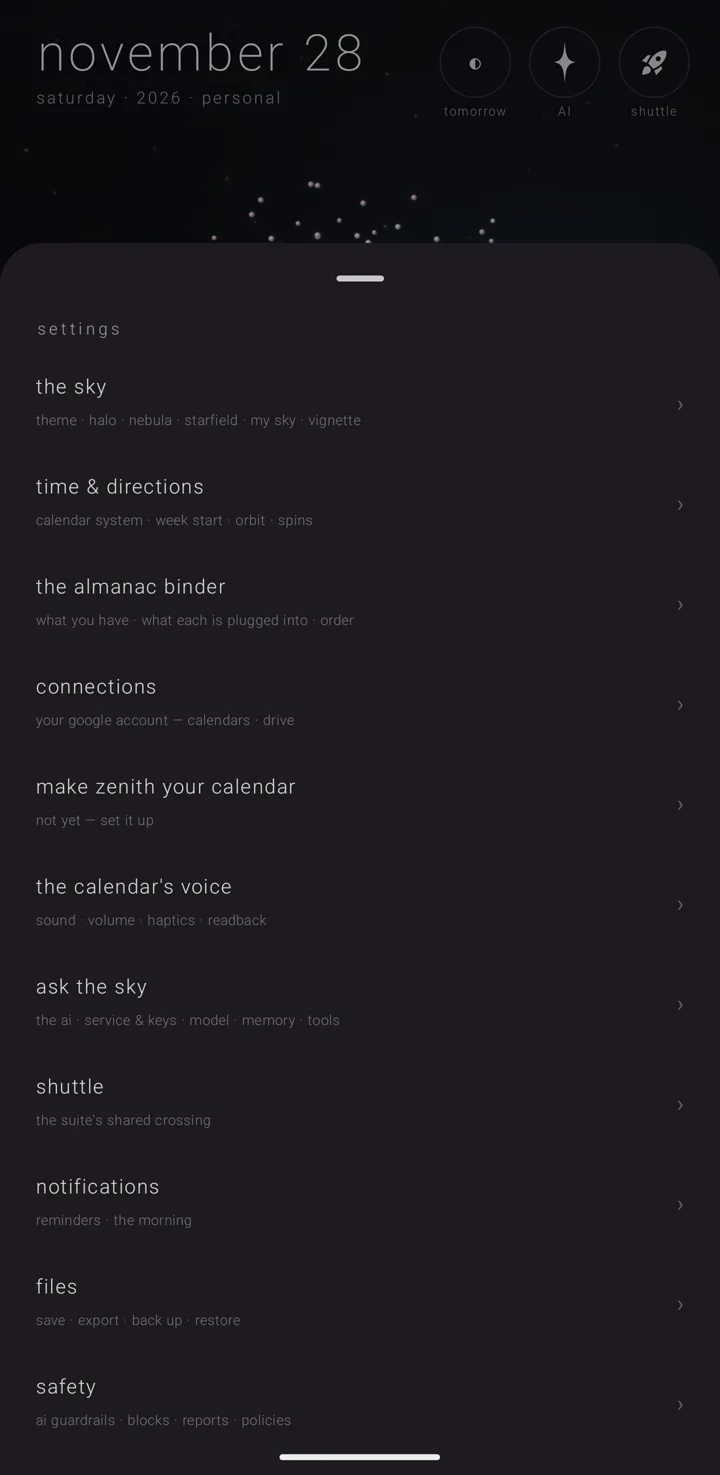
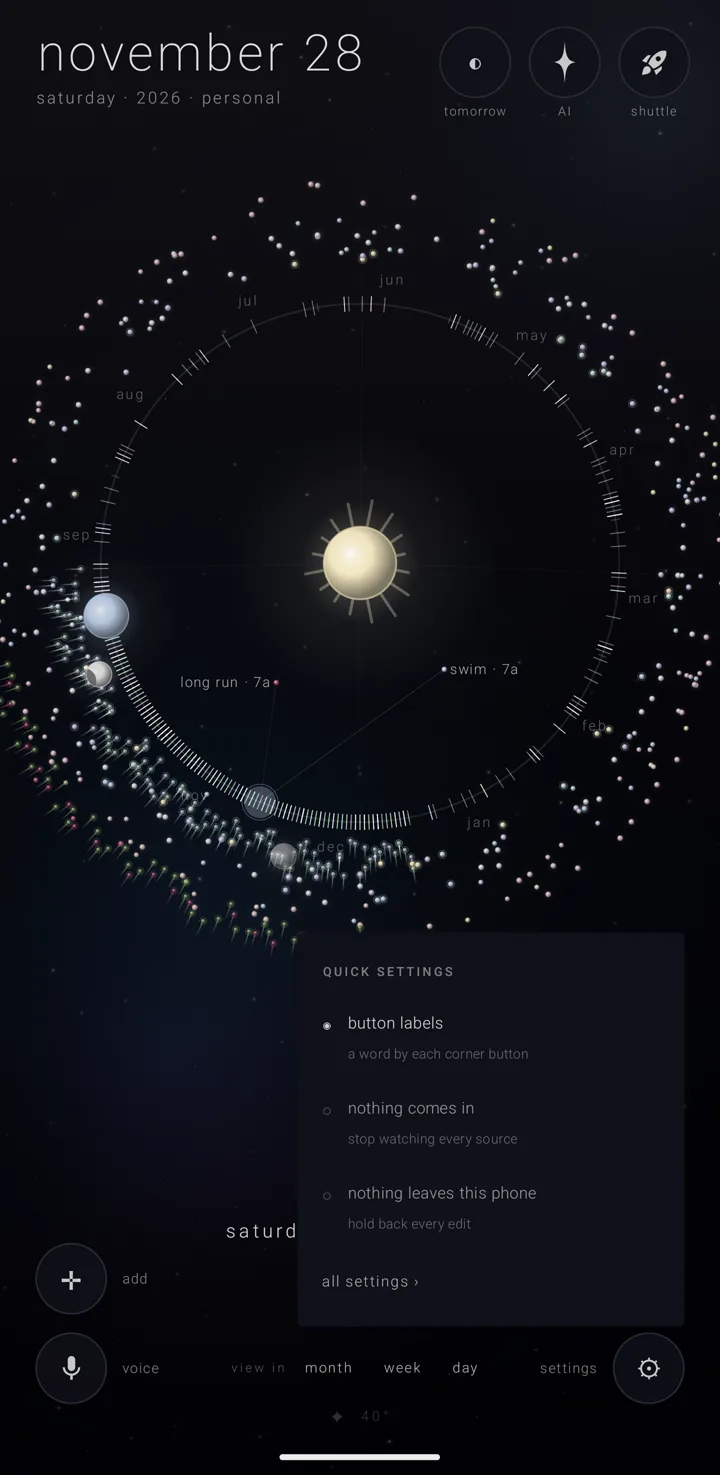
The settings book is where every setting in the calendar lives. A short quick-settings menu sits in front of it for the few you change often.
Opening it
On the sky — the whole calendar, one canvas that becomes each view — find the gear ⚙ in the bottom-right corner, labelled "settings".
- Tap the gear for quick settings.
- Hold the gear for the whole settings book — or tap the gear, then "all settings ›".
It is that way round because you reach for the quick list often, and the book less often.
In the binder — where your almanacs live — the same gear works the other way round. A tap opens the binder's own "all of them" panel, and a hold opens quick settings.
Quick settings
A small menu opens beside the gear, headed "QUICK SETTINGS". It has three rows. Each shows a filled circle "◉" when on and an empty circle "○" when off, with a line under it.
| Row | Its line |
|---|---|
| "button labels" | "a word by each corner button" |
| "nothing comes in" | "stop watching every source" |
| "nothing leaves this phone" | "hold back every edit" |
"button labels" is the same switch as on settings › "ease" (see Ease — presets & sizes).
The last two rows are the same two settings the binder's own panel carries, with the same results. When you turn "nothing leaves this phone" back off, everything kept back while it was on goes out, and the Drive copies are carried up. See What comes in, what goes out.
At the foot, "all settings ›" opens the book.
The book
The book is a sheet headed "settings". It holds sixteen rows, each a name with a line under it and a "›" on the right. It ends with "· close ·".
Eleven rows open a page inside settings. Five open a room of their own: the binder, the almanac switches, the connections screen, the setup sheet and the Shuttle.
| # | Row | Its line | Covered on |
|---|---|---|---|
| 1 | "the sky" | "theme · halo · nebula · starfield · my sky · vignette" | Skies, colours & my sky |
| 2 | "time & directions" | "calendar system · week start · clock · orbit · spins" | Calendar systems & names, Time & directions |
| 3 | "the almanac binder" | "what you have · what each is plugged into · order" — this opens the binder itself | The binder |
| 4 | "the almanacs" | "which of zenith's almanacs are on this phone" — this opens the almanac switches | Holiday almanacs |
| 5 | "connections" | "your google account — calendars · drive" | Connected accounts & Drive sync |
| 6 | "make zenith your calendar" | a live line, worked out by asking the phone each time | Install & make it your calendar |
| 7 | "the calendar's voice" | "sound · volume · haptics · readback" | The calendar's voice |
| 8 | "ask the sky" | "the ai · service & keys · model · memory · tools" | Ask the sky — the assistant |
| 9 | "shuttle" | "the suite's shared crossing" | The Shuttle in the calendar |
| 10 | "notifications" | "reminders · the morning" | Reminders, The morning, the evening bell & tomorrow |
| 11 | "the morning" | "the morning · the afternoon · the evening · the night · your own" | Announcements |
| 12 | "files" | "save · export · back up · restore" | Backup, restore & sending an almanac |
| 13 | "safety" | "ai guardrails · blocks · reports · policies" | Safety, consent & your rights |
| 14 | "ease" | "colour strength · labels · turning the phone · haptics · reduce motion" | Ease — presets & sizes, Ease — motion, colour & touch |
| 15 | "zenith gold" | "what it opens · $1.99, once" — or, once bought, "zenith gold ✦" with "yours — what it opens" | Zenith Gold in the calendar |
| 16 | "about" | "black syntax · zenith calendar" | below |
"turning the phone" — whether the app follows the phone's rotation — is on the "ease" page.
Two pages are reached only from inside another. "folds & tablets" sits inside "zenith gold". "my sky" sits inside "the sky", reached by "my sky settings ›", which shows only while my sky is on. Stepping out of either lands you back on the page it sits in, not on the list. See Folds, tablets & wide screens and Skies, colours & my sky.
A page's name is one fact. The row that opens a page and the header at the top of that page always read the same. With no page open, the header shows the book's own name.
Moving around the book
Three things all step you out one layer: the "‹ ‹name›" row at the top of a page, the phone's back gesture, and a swipe down on the page. One back is one step.
If something else opened settings straight onto a page, stepping out closes settings, instead of taking you to a list you never walked through.
Every page opens scrolled to its own top, wherever the list was scrolled.
Its size. On a phone the book takes up a little over three-quarters of the screen's height. In the docket on a wide screen (Gold) — the panel beside the sky — it fills that whole side, top to bottom. See The docket, the second sky & the desk clock.
Gold is checked again on the way back. The Play Store answers in its own time, so the book asks again whenever it comes back to the front. A Gold feature reached on any page opens the one Gold sheet, the same everywhere.
Two things the book handles itself
- Backups. "back up everything" asks you for a folder and writes the backup into it. Installing a backup reads the file first, then asks "replace everything?", saying what is in it and what will be dropped. Both are free. See Backup, restore & sending an almanac.
- Remembered talks. The assistant's remembered talks are edited in the book too. Tap a line to rewrite it or burn it. See Chat memory & interpret screen.
"about"
The last row. Its page holds, from the top:
- The app's name, "zenith calendar", with a "✦" added while Gold is yours.
- One sentence on what the calendar is: "the model is the calendar — a living orrery of your time. commitments are meteors (once), asteroids (they return), and fixed stars (every year); almanacs are the skies they live in."
- The version number, with the version of the shared Zenith layer on the line beneath. The calendar is built on parts shared across the suite, and the app's version alone cannot say which ones you have.
- "built by black syntax · part of the zenith suite".
- A "CONTACT & PUBLISHING" heading with three rows: "zenith suite", "black syntax · developer" and "friend castle · publisher". Each has an email address and a website under it. Tap the address to open your mail app, or the site to open it.
- "more apps →".
- A "FEEDBACK" heading with the line "tell us what the sky got wrong — it reaches a person", and "write to support ↗". That opens an email with the version in the subject, and the version, Android release and phone model in the body.
- A "CREDITS" heading for my sky's real stars: "star positions: Yale Bright Star Catalogue" and "constellation figures: IAU & Sky & Telescope (Sinnott, Fienberg), via d3-celestial by Olaf Frohn (BSD)". Under them, "licenses →" shows the licence notices in full; it then reads "hide licenses".
- A crash report, only if one was ever written on this phone, with "send the crash report ↗" and "· discard ·" side by side. Choosing not to send is as easy as sending.
- "support ↗".
- An "AGREEMENTS & POLICIES" heading with four links, including "privacy policy", "acceptable use" and "ai & safety".
See also.
Ease — presets & sizes · Zenith Gold in the calendar · Privacy, permissions & what leaves the phone · Quick reference