The sky
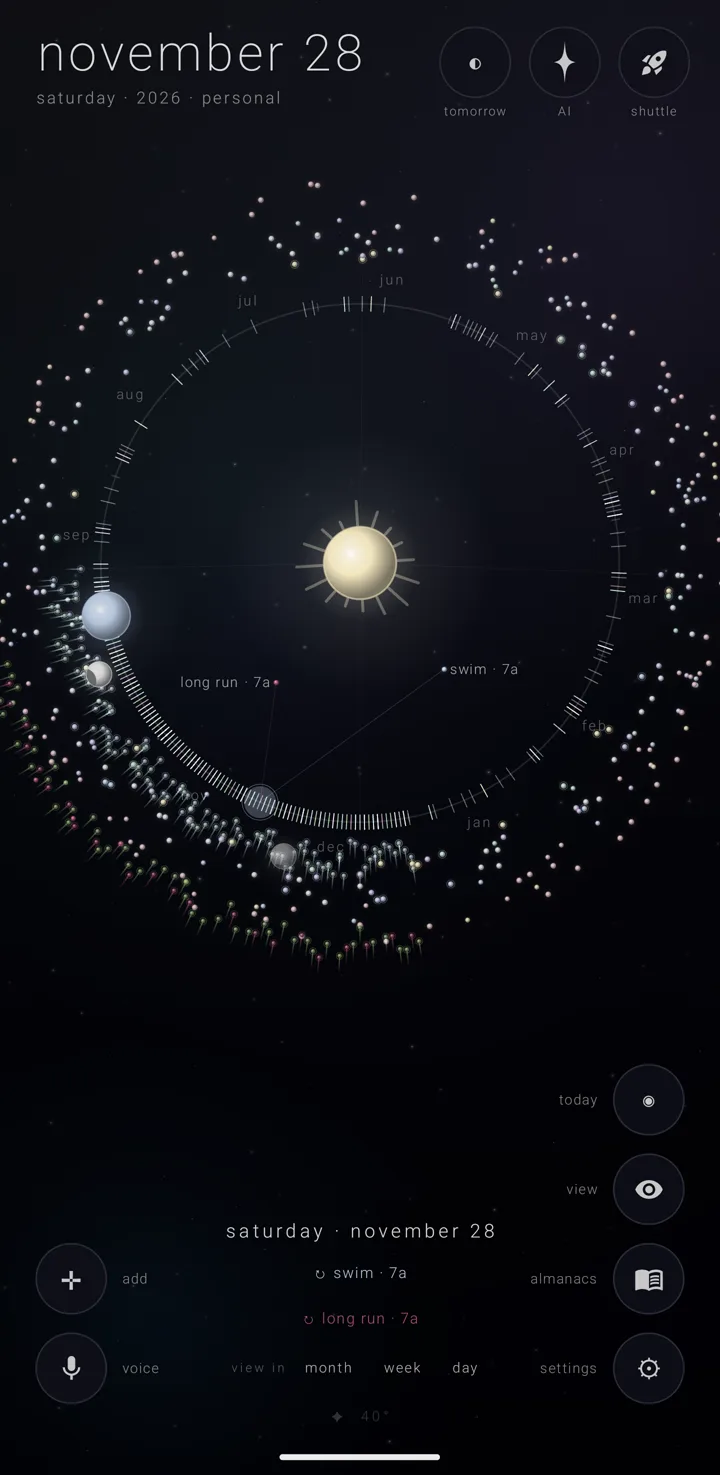
The sky is the whole of Zenith Calendar — one canvas that becomes all five views. The drawing is not a picture laid over a calendar. It is the calendar: a working model of your year called the orrery — the sun, the earth, the moon and your commitments, drawn where they truly stand. See The orrery.
What is drawn on it
The sun holds the centre, a little above the middle of the screen.
A great ring runs round it. That ring is the year. Ticks mark where each month begins, and each month's name is written at its middle.
Today's earth rides the ring at today's place. The moon circles it at its true phase. Both are drawn live only while the current year is showing. When you pick any other day, a faint ghost earth — a dim stand-in for the earth on that day — sits there instead, with a dimmer moon beside it.
Outside the ring stands a field of bodies. Each almanac — a named, coloured layer of commitments, like one calendar — gets one body a day.
Behind everything is a field of invented stars, set by the "starfield" switch. Turn on "my sky — the real stars overhead" (Gold) and the real stars over where your phone is are drawn instead, turned so the Sun's true direction lands where the sun is drawn. My sky is one sky for every Zenith app, in three versions — "classic", "collection" and "carousel" — set on its own page, the same in each app. With it on, three fingers move the stars. Both live in settings › the sky. See Skies, colours & my sky.
The five views
All five are this same canvas, seen another way.
- the year — the whole year as the ring, seen face-on. The app opens here.
- the years — the ring tipped on its edge, a ladder of years up and down the screen.
- the day — one day as the earth itself, read like a clock.
- the week — a week under its moon, with a grid of days below.
- the month — a grid of six rows of seven days, with the moon resting half off the bottom edge.
How to move between them is in Moving between the views.
The big date, top left
The top-left corner shows the picked day — "september 18" — and under it "friday · 2026". When more than one almanac can take a new commitment, an almanac's name is added after it, as " · ‹almanac›".
With another calendar system chosen, it shows that system's date, with the gregorian date small underneath. In the years view it shows the year, then "the sun, moving through the years".
Tap the big date to go to today.
The corner buttons
These quiet buttons stand in every view. Each can show its name beside it — that is the "button labels" switch. The names step aside while the almanac chips are open.
Bottom left, a column:
- the cross ✛, "add" — tap for a new commitment on the picked day; hold for a choice of "✛ a commitment" or "◔ an almanac"
- the microphone, "voice" — for speaking commitments
Bottom right, a column:
- the left chevron ‹, "back" — shown anywhere but the year
- the ringed dot ◉, "today" — shown only while the picked day is not today, or another year is showing
- the eye, "view" — on every view. It puts repeating commitments out of sight; see The eye — putting repeats away
- the book, "almanacs" — tap for the floating almanac chips; hold for the binder
- the gear ⚙, "settings" — tap for quick settings beside it; hold for the whole settings book
On the shortest screens, where five buttons cannot stand in this column, the eye stands at the top of the bottom-left column instead, above ✛.
Top right, a row:
- the half-filled circle ◐, "tomorrow"
- the star, "AI" — only while the assistant is on
- the rocket, "shuttle" — wears a count in a pill when something is riding it. The Shuttle is the suite's shared tray for passing things between Zenith apps
At the foot of the sky
The picked day's commitments appear as plain words at the bottom. This is the brief — the day's list. See The day brief.
Below it, a faint line gives the weather where you are: a glyph and the temperature. See Weather.
When the app needs to tell you something, it shows one quiet line at the bottom centre, on a dark backing. It passes after four seconds.
Where the sky stands
On an upright phone, the sky fills the screen. On an open fold, a tablet, or a phone held sideways, it takes a frame of its own, clear of the big date and the corner buttons. See Folds, tablets & wide screens.
See also.
The orrery · Moving between the views · The year & the years · The day brief