The month view
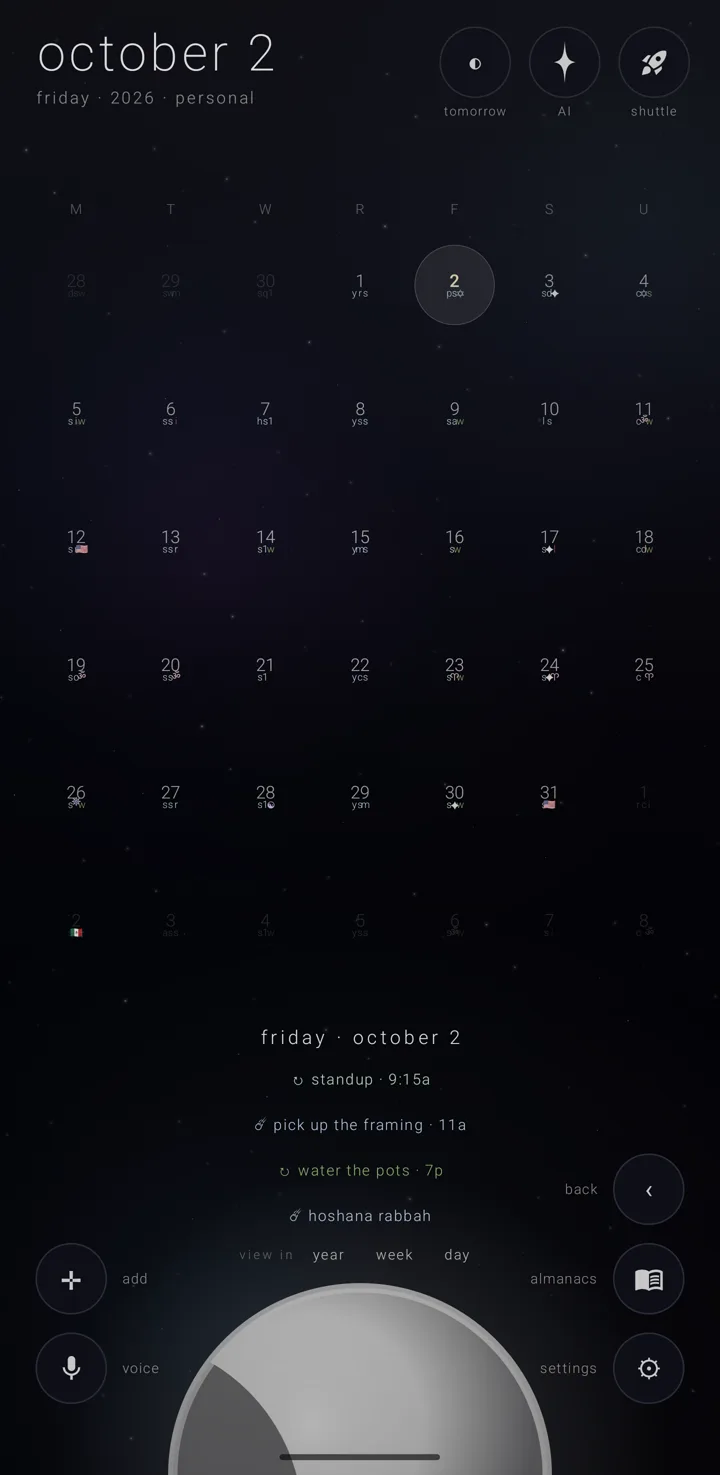
The month view is a month as a grid, with the moon resting half off the bottom edge.
Getting here
- Carry the moon down past halfway in the week view.
- Tap "monthly" in a brief's "view in" row.
The grid
Weekday names crown six rows of seven days. The grid starts on the week's first day, and uses whichever day-name style is set. See Time & directions.
- Days from the months either side are faint.
- Today's number is drawn in the sun's colour.
- The picked day is ringed. The ring is never taller than its own row.
The month's name is not written over the grid. The big date in the top-left corner already says it.
Marks
Each day shows up to three of its commitments as marks. A mark is the commitment's own picture, else its glyph, else its almanac's, else the first letter of its title or of its almanac's name. A bare dot appears only when there is truly nothing to draw.
The eye, "view", stands here as on every view. A kind of repeat it is putting away is not among a cell's three marks, and a scrub over the day neither feels nor plays it. See The eye — putting repeats away.
Zenith Tasks' stars
While the eye's "tasks" pill is on, a day holding one or more stars Zenith Tasks has given a due date shows one small four-point star at its cell's upper right. It is never counted among the three marks. It is dimmed and crossed out only when every star that day is done.
Tap the day to open its brief. Each star is listed there, and a tap opens it in Zenith Tasks. See The day brief.
The moon
The moon rests at the foot, half off the bottom edge. It shows the picked day's phase, in the chosen sky's moon colour, lit from the sun's true direction for that date.
Taps
- One tap picks a day and opens its brief below. The brief is the picked day's list of commitments.
- The same day tapped again falls into the day view. See The day view.
- A tap on the moon takes hold of it.
The grid keeps its own month. Tapping a faint day from the next month does not jump the calendar.
Scrubbing the grid
Start a drag inside a day cell, and you read the days.
- Each cell your finger crosses picks that day and opens its brief.
- The grid stays on the month it began in for as long as the scrub lasts. Crossing a faint day from the next month never shifts it under your finger.
- Each day plays up to three notes — one for each mark the grid draws — staggered so they arrive as a little figure rather than a chord. An empty day still answers with one low, soft note.
You feel the cells, harder on a day holding something. The margins round the grid are silent.
Rolling the months
A sideways stroke that is not a scrub rolls the months. It works on the moon, in the space round the grid, anywhere the scrub did not claim.
On release, the grid moves one month for each short stroke. The picked day rides along: the same day of the month, or the month's last day if the new month is shorter.
With another calendar system chosen, it rolls that system's months. In a Hebrew leap year, adar i and adar ii count as two. Choosing a calendar system moves the grid to it at once. See Calendar systems & names.
Which way is next follows the direction you stroke. It reverses while "reverse the moon's spin" is on. See Time & directions.
Lifting the moon to the week
- Take hold of the moon: tap it, or lift gently starting on the moon, or pull firmly upward anywhere.
- While you carry it, the sky dims and a faint road shows the path between its two resting places.
- Let go past halfway and the week opens, on the week the picked day falls in. Let go short of halfway and the moon drifts home.
A tap while carrying sets it back down. See The week view.
Holding to add
Hold any cell of the six rows to start a new commitment on that day. This includes the faint days from the months either side. See Add a commitment.
The brief and the hint
The brief stands in the band between the foot of the grid and the top of the moon, so the grid's last rows stay readable. Its list scrolls inside that band. See The day brief.
The hint under the grid reads "tap a day to open it · tap it again to visit its earth · stroke the moon for other months". It steps back while a day's brief is open, since the brief stands where it sits. While the moon is held, it reads "lift the moon · past halfway lies the week". Before you take hold of the moon, nothing on screen mentions the grab.
Held sideways, and on big screens
On a phone held sideways, the grid stands below the big date and to the right of "voice" and "add" and their words. The hint and the moon sit underneath, the moon rising under the middle of the grid. The hint wraps to two lines between the grid and the moon.
The grid also keeps clear of the right-hand corner buttons — but only while each column stays wide enough to read. Narrower than that, the grid takes the full width.
On an open fold or a tablet, the grid starts near the top of the sky's own frame and the moon is drawn smaller. The grid, the day's words and the moon each keep their room. See Folds, tablets & wide screens.
See also.
The week view · The day view · The day brief · Calendar systems & names